Channels that post from your own login
Some platforms have no official way for an app to post to the kind of account you have, for example a personal Instagram account. For those, Postbird can post from your own account login, the way you would from your phone. These channels say Your own login in the connect window and on their row under Connected. Like every channel, a brand holds one account per network, whichever way it was connected; see one account per network.
The session channels are:
- Instagram (personal): sign in with the account’s username and password. In the connect window it is the Personal account choice.
- Telegram channel (personal account): post to a Telegram channel you run, from the Telegram account you connected in DM Champ. In the connect window it is the Your personal account choice.
- Skool: post to a Skool community from the Skool account you connected in DM Champ.
- Reddit: post to a subreddit from your own Reddit account, using the login you already have in your browser.
- TikTok (your own login): the Use your own login choice on TikTok uploads from the login you already use in your browser.
- Medium: publish a story to your Medium profile from your own Medium login. Medium no longer lets new apps connect, so this is the only way.
- Dribbble: upload a shot to your Dribbble profile from your own Dribbble login. Dribbble does not let outside apps upload shots.
- WhatsApp groups: post into a WhatsApp group from your own WhatsApp number connected in DM Champ with WhatsApp Web. The group does not need to be set up as a chat, and posts there never start the AI.
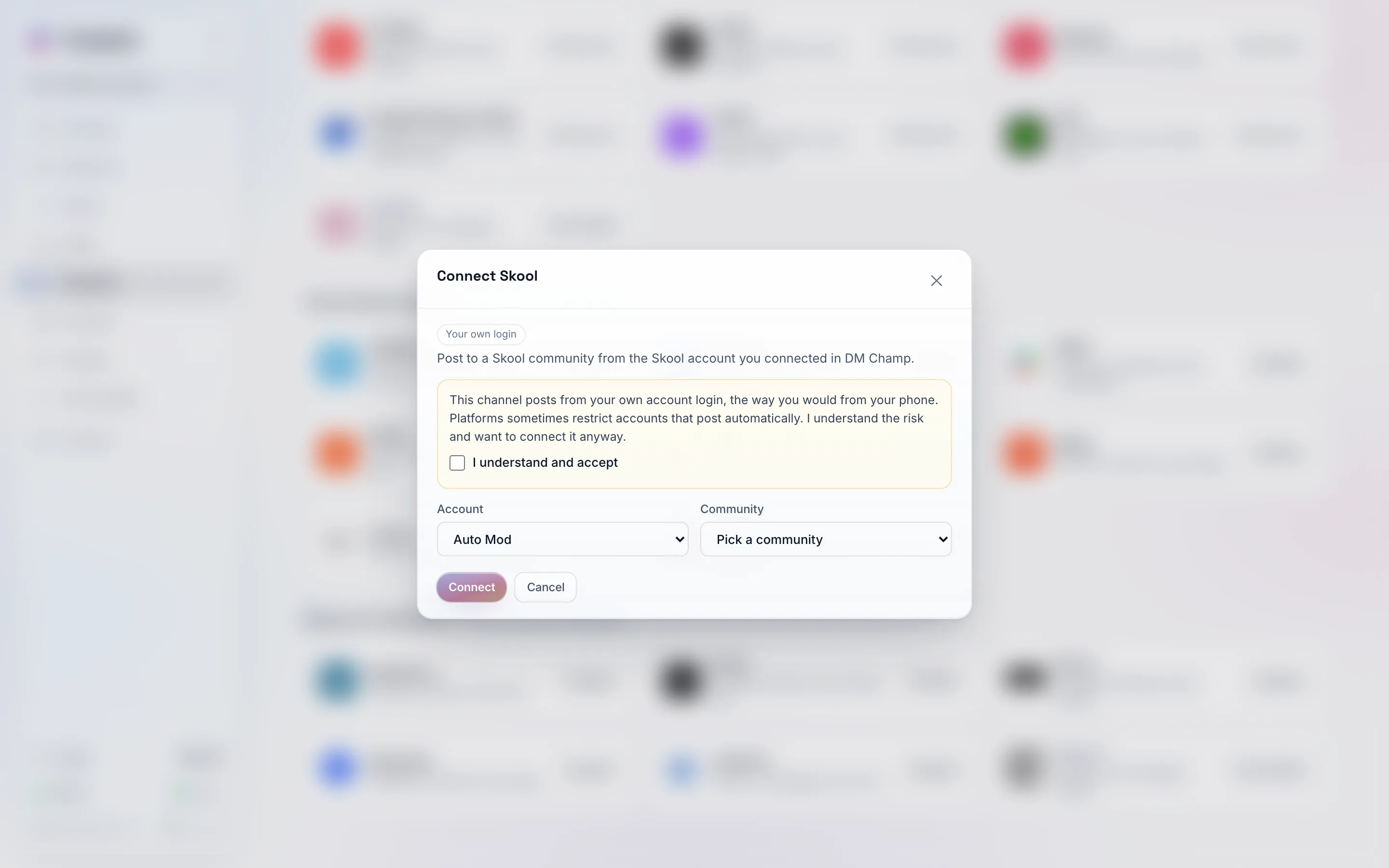
A session channel always starts with the risk notice. Connect stays off until you tick the box.
The risk, in plain words
Posting from a login is not the same as posting through an official connection. Before you connect, Postbird shows this notice, and Connect stays off until you tick I understand and accept:
This channel posts from your own account login, the way you would from your phone. Platforms sometimes restrict accounts that post automatically. I understand the risk and want to connect it anyway.
What that means for you: the platform could limit or lock the account if it decides the posting looks automated. Postbird keeps the pace of posting calm to lower that risk, but it cannot remove it. Use a session channel only for an account you accept that risk on.
The first connect of a brand
Instagram (personal) and Reddit post as if from one steady place per brand, the way a person posts from their own home. Postbird sets this up for you the first time the brand connects one of these channels; if Connect says This brand is still being set up for this channel, try again a few minutes later.
How to connect each one
- Open Channels and click Connect on the network. For Instagram, Telegram and TikTok, pick the own login choice in the window that opens.
- Read the notice and tick I understand and accept.
- Then, per channel:
- Instagram (personal): type the username and password. The password is used once to sign in and is not kept. You can pick the country the account usually signs in from (leave it on Not sure if you do not know). If Instagram asks for a code, type it in the next step.
- Telegram channel (personal account): pick the Telegram account, then the channel. The account must be connected in DM Champ first (Settings, Channels), and you must be allowed to post in the channel.
- Skool: pick the Skool account, then the community. Connect Skool in DM Champ first. A video goes in as a link.
- Medium: paste your Medium login cookie from your browser (the
sidcookie, or a cookie export). The first line of the post becomes the story’s title (up to 100 characters), the rest is the story, and #hashtags become its topics (up to 5). Images only, no video. - Dribbble: paste your Dribbble login cookie from your browser (the
_dribbble_sessioncookie, or a cookie export). A Dribbble post is one image: the first line of the post becomes the shot’s title, the rest its description, and #hashtags its tags. - WhatsApp groups: pick the WhatsApp number, then the group. Connect the number with WhatsApp Web in DM Champ first (Settings, Channels). Only groups your number can post in are listed: in a group where only admins can send messages, the number has to be an admin. A brand posts to one WhatsApp group; to post to another group, add a second brand. Text, images, videos and documents go in as one message.
- Reddit: paste your Reddit login cookie from your browser, the subreddit (for example r/SaaS) and, if the subreddit needs one, a flair. Add the same account again for another subreddit.
- Click Connect.
If a channel like this is not switched on yet, its card or choice shows Coming soon, or its window shows Not available yet instead of a form. Close the window with the cross or the Esc key.