Subscription Tiers
Overview
There are three plans: Business, Agency and Agency Unlimited. Every plan includes every messaging channel, unlimited AI agents and unlimited contacts, and each one adds a monthly pot of AI credits. The difference between them is how many AI credits and team seats you get, and whether you can run client accounts under your own brand.
Prefer to see it? Click through the whole flow:
How to see plans and prices: Settings → Workspace group → Billing, then the Available plans card. Live prices are pulled straight from our billing system, so the numbers you see there are always current. You can also buy from the pricing page at dmchamp.com/pricing, which creates your account for you and emails your login details.
On a lifetime deal? If your plan is an AppSumo tier, you won’t see the Available plans card at all, and that’s deliberate. Those are monthly subscriptions, and you already own your tier outright, so there’s nothing there for you to buy. The AppSumo lifetime deal ended on August 14, 2026, so tier changes through AppSumo are no longer available; if you need more, you can move to the Agency or Agency Unlimited monthly plans at dmchamp.com/pricing. Everything else on Billing works the same as any other plan: your credit balance, Add credits, auto-recharge and usage history are all still there.
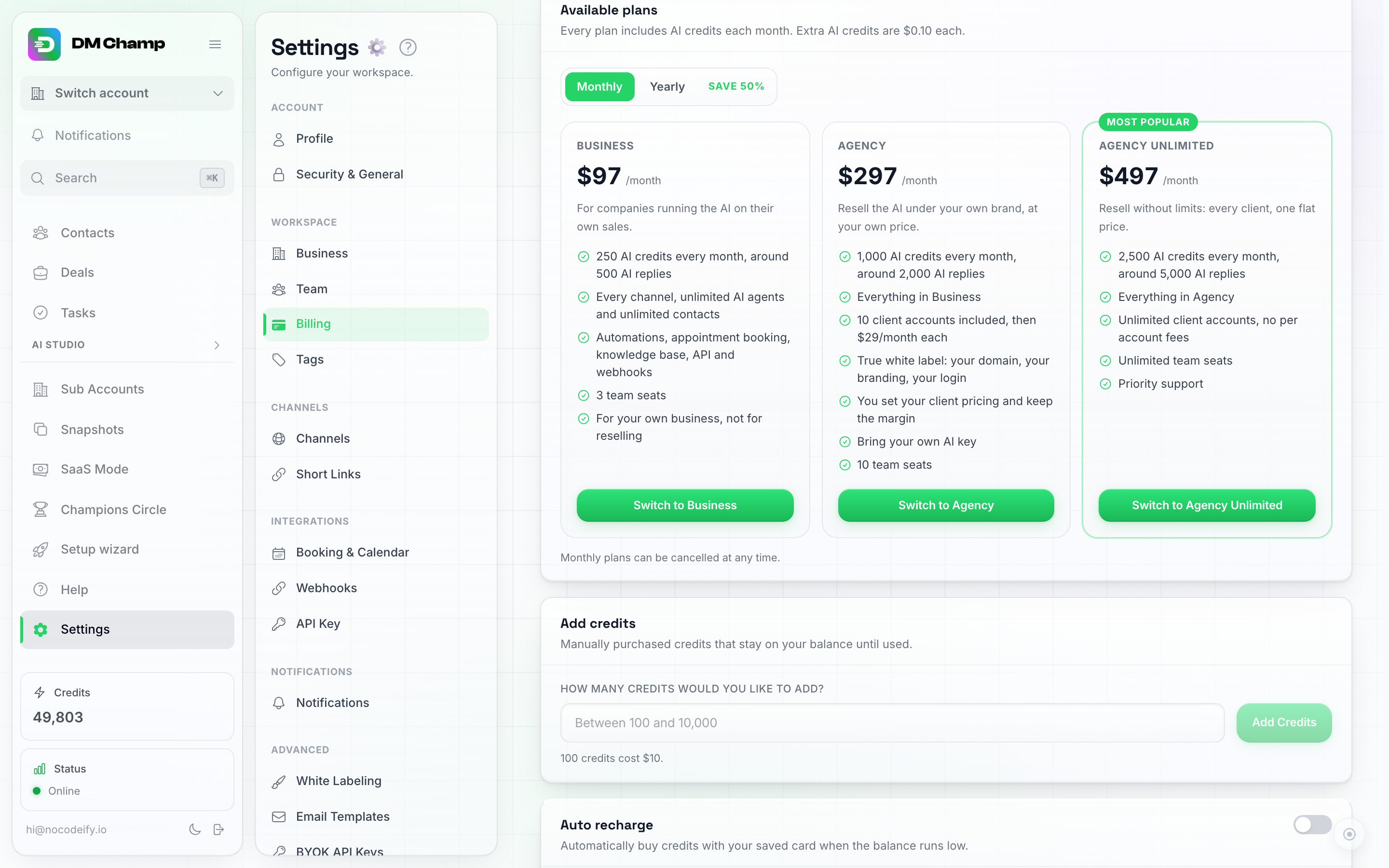
The Available plans card: Business, Agency and Agency Unlimited, with a Monthly / Yearly toggle. Your current plan is marked, and prices shown here are always live, pulled straight from the billing system.
The Three Plans
| Plan | Monthly | Yearly (50% off, paid up front) | AI credits included each month | Team seats | Client accounts | The extras |
|---|---|---|---|---|---|---|
| Business | $97 a month | $582 a year, which works out to $48.50 a month | 250 credits, around 500 AI replies | 3 | Not included | Every channel, unlimited AI agents and contacts, automations, appointment booking, knowledge base, API and webhooks |
| Agency | $297 a month | $1,782 a year, which works out to $148.50 a month | 1,000 credits, around 2,000 AI replies | 10 | 10 included, then $27 a month for each extra one | Everything in Business, plus full white-labeling (your own domain, branding and login), your own client pricing so you keep the margin, and bring your own AI key |
| Agency Unlimited | $497 a month | $2,982 a year, which works out to $248.50 a month | 2,500 credits, around 5,000 AI replies | Unlimited | Unlimited, with no per-account fee | Everything in Agency, plus priority support. |
Prices use the same numbers in every currency we sell in, so $97 is €97 is £97.
Running a lot of client accounts? Past roughly 17 client accounts, Agency Unlimited costs less than Agency plus $27 for each extra account.
What’s on every plan
Every plan, Business included, comes with:
- Every messaging channel: WhatsApp Business API, WhatsApp Web, SMS, Instagram DMs, Facebook Messenger, the website chat widget, Telegram, LINE, Viber, iMessage, Instagram (Personal) and Email.
- Unlimited AI agents and unlimited contacts, and no plan cap on how many AI replies a chat gets (each AI reply still uses credits).
- The full 100k-character instruction budget per agent.
- Automations, appointment booking, the knowledge base, tasks, daily summaries and the media library.
- Image, voice note, video and document understanding.
- Automatic follow-ups, real-time web search and contact tagging.
- API access, webhooks and custom functions.
The What’s included in your plan list on Settings → Billing is always the authoritative answer for your own account.
Feature comparison
| Feature | Business | Agency | Agency Unlimited |
|---|---|---|---|
| AI credits each month | 250 | 1,000 | 2,500 |
| Team seats | 3 | 10 | Unlimited |
| Client accounts | – | 10, then $27 a month each | Unlimited |
| Every messaging channel | Yes | Yes | Yes |
| AI agents | Unlimited | Unlimited | Unlimited |
| Contacts | Unlimited | Unlimited | Unlimited |
| Broadcasts | Yes | Yes | Yes |
| Automations | Yes | Yes | Yes |
| AI appointment booking | Yes | Yes | Yes |
| Knowledge base and FAQs | Yes | Yes | Yes |
| Image, voice, video and document understanding | Yes | Yes | Yes |
| Automatic follow-ups | Yes | Yes | Yes |
| Real-time web search | Yes | Yes | Yes |
| API access, webhooks and custom functions | Yes | Yes | Yes |
| White-labeling | – | Yes | Yes |
| Sell to your own clients at your own prices | – | Yes | Yes |
| Bring your own AI key (BYOK) | – | Yes | Yes |
| Priority support | – | – | Yes |
Reply to comments. Replying to comments is included on every plan sold today. A few legacy and agency-granted plans leave it out; on those, comments are still captured in your inbox but no public reply or DM is sent automatically. Check Settings → Billing for your plan’s feature list.
WhatsApp Web. WhatsApp Web is available on every plan. Each connected number costs 50 credits a month, and there is no per-message fee on top.
Yearly Billing and the 90-Day Guarantee
Pay for a year up front and you pay half: $582 on Business, $1,782 on Agency, $2,982 on Agency Unlimited. Your monthly AI credits arrive every month exactly as they do on a monthly plan.
Every yearly plan carries a 90-day money-back guarantee, no conditions attached. If it isn’t for you within the first 90 days, tell us and you get your money back. The guarantee covers the yearly plan fee; extra credits bought on top of the plan (top-ups and auto-recharge) are not refunded.
Monthly plans don’t carry that guarantee. Instead you can cancel at any time from Settings → Billing (see Downgrading or Cancelling), and you keep your plan until the end of the month you’ve paid for. If we ever bill you in error, we fix it and refund it on any plan.
Is There a Free Trial?
Not from the pricing page. Plans bought there are paid upfront, there is nothing to book or sit through before you can start, and on monthly you can cancel any time.
A 7-day free trial is offered on some of our ad offers. If you arrived through one, you pick a plan after signing up and your card is charged after the trial. See Free Trial.
If you want to see what the AI is like before you pay, chat with ours at dmchamp.com/chat. It’s the same product answering you.
New accounts also start with a one-time 100-credit welcome bonus. Those are ordinary credits, and there is no separate period where AI runs free of charge.
How to Buy
- Open dmchamp.com/pricing, pick your plan and choose monthly or yearly.
- Pay by card. You are taken to a short form to finish setting up your account, and the link to it is emailed to you as well.
- Already have an account? Go to Settings → Billing instead and pick your plan from the Available plans card. A checkout paid with the email of an account that already has an active plan does not change that account: the payment is refunded in full and the new plan is cancelled.
- Want a second, separate account? Check out with a different email address. Each email address holds one account.
Feature Details
Contacts and AI Agents
All three plans include unlimited contacts and unlimited AI agents, so nothing stops you importing your whole list or running a different agent per channel, product or language.
Channels
Every plan includes every messaging channel, so you can connect as many as you need.
Available channels include WhatsApp Business API, WhatsApp Web, SMS, Instagram DMs, Facebook Messenger, the website chat widget, Telegram, LINE, Viber, iMessage, Instagram (Personal), and Email. The Messaging Channels section of these docs is the canonical list.
AI Responses per Chat
None of the three plans caps how many AI replies a chat gets, so the bot never stops replying in a conversation because of a plan limit. Each AI reply still uses credits as usual. Separately, every agent has its own Max AI messages per chat setting under Response limits, which you can lower if you want the AI to pause after a set number of replies to one contact.
Client Accounts (Sub-Accounts)
Client accounts are the separate workspaces you run for the businesses you look after, each with its own channels, contacts and agents. They are included on the Agency plan (10 of them, then $27 a month for each extra one) and on Agency Unlimited (unlimited, with no per-account fee). They are not part of the Business plan.
A client account you have paused (the Hard blocked status, where the client sees a lock screen and their AI stops answering) is left out of the count: it doesn’t use up one of your included accounts and you’re not charged the extra-account fee for it. That is priced by the day, so pausing an extra account on the 10th and switching it back on the 20th bills those ten days only. A Soft blocked account still counts, because its AI is still answering. See Blocking / Pausing a Sub-Account.
The AppSumo lifetime tiers have their own sub-account ladder. Sub-accounts start at Tier 2: 3 / 10 / 20 / 100 / unlimited on Tiers 2 through 6. Tier 1 is a single workspace with no sub-accounts. See Sub-Account Management for full details.
Team Seats
Business includes 3 seats, Agency includes 10, and Agency Unlimited has no seat limit. Pending invitations count against your seat allowance. See Team Management.
The AppSumo lifetime plans
The AppSumo lifetime deal ended on August 14, 2026 at 12:00 noon US Central time and can no longer be bought. A tier bought while the deal was running is a one-time purchase: its features and its one-time credits stay with the account permanently, and there is no monthly platform fee for it. New accounts choose from the Business, Agency and Agency Unlimited plans at dmchamp.com/pricing.
The AppSumo lifetime deal had six one-time tiers: Plan 1 $59 (0 sub-accounts), Plan 2 $159 (3), Plan 3 $259 (10), Plan 4 $359 (20), Plan 5 $679 (100), Plan 6 $999 (unlimited).
AppSumo tiers include a one-time credit allocation that does not refill each month: 100 on Plan 1, 300 on Plan 2, 500 on Plan 3, 750 on Plan 4, 1,500 on Plan 5 and 3,000 on Plan 6.
Every AppSumo tier includes unlimited channels, unlimited contacts and unlimited AI agents. A few features scale with the tier: the AI instruction budget per agent is 20,000 characters on Plan 1, 50,000 on Plan 2, 75,000 on Plan 3 and the full 100,000 on Plans 4 to 6; AI responses per chat are capped at 20 on Plan 1, 50 on Plan 2 and 100 on Plan 3, and unlimited from Plan 4 up. The per-chat cap counts the AI message counter shown in a contact’s Activity stats, so pressing Reset there gives that contact a fresh count. Webhooks, API access, custom functions and BYOK start at Plan 2; white-labeling starts at Plan 3.
Nothing about the AppSumo tiers has changed: the tiers, their terms and their credits stay exactly as they were bought.
Which monthly plan is my AppSumo tier equivalent to?
There is no exact match, because the two ladders were built differently — but here is the honest comparison:
| Your tier | Closest monthly plan on features | Where it differs |
|---|---|---|
| Plan 1 | Business | No sub-accounts, no white-labeling, no BYOK, no API or webhooks; 20,000-character instruction budget and 20 AI replies per chat, where Business has the full 100,000 and no per-chat cap |
| Plan 2 | Business, plus API, webhooks, custom functions and BYOK | 3 sub-accounts, which Business does not have at all; no white-labeling |
| Plan 3 | Agency | 10 sub-accounts, matching Agency’s included 10; white-labeling starts here |
| Plan 4 | Agency | 20 sub-accounts, more than Agency’s included 10, and the full instruction budget and uncapped AI replies |
| Plan 5 | Agency | 100 sub-accounts |
| Plan 6 | Agency Unlimited | Unlimited sub-accounts |
The one difference that matters most is credits. Every monthly plan refills credits each month (250, 1,000 or 2,500); AppSumo tiers came with a one-time allocation that does not refill. Once it is spent, you top up at the normal credit price, or connect your own AI key if your tier includes BYOK. That is the trade in exchange for having no monthly platform fee.
If you want the monthly credit refill and priority support, moving to a monthly plan is the way to get them — your lifetime tier’s features are otherwise yours permanently.
Moving a lifetime tier to a monthly plan replaces it. The move happens in the Stripe portal (Settings → Billing → Manage billing → Open Stripe portal, then Update plan inside Stripe). Your lifetime tier and the monthly plan are the same subscription, so choosing a monthly plan there swaps the lifetime tier for it and the first month is charged right away. Because that is easy to do by accident, accounts on a lifetime tier see a You’re on a lifetime plan notice before the portal opens. Updating your card and downloading invoices in the portal never changes your plan, so Continue to Stripe is safe for those. If you moved to a monthly plan and want your lifetime tier back, contact support and we switch you back. If the monthly plan ends instead, your lifetime tier comes back on its own.
Redeeming your AppSumo purchase
If you bought the deal, redeem it from your AppSumo account: open Products, find the deal and click the button to access or redeem it. That sends you to the signup page with your license already attached — create your account there and your lifetime plan activates automatically.
Already have an account? Sign in to it first, then click the redeem/access button on AppSumo. Instead of the signup form you land on the license page with your key already filled in: click Link license and your lifetime plan is applied to your account right away. If you were signed out and the signup page says an account with your email already exists, click Sign in instead: after you sign in, the same license page opens with the key filled in.
You can also link a key by hand: go to app.dmchamp.com/appsumo, sign in if it asks, paste the license key from your AppSumo account and confirm.
Upgraded your tier on AppSumo while the deal was running? An upgrade (or a refund followed by a new purchase) issued a new license key, and your account keeps running on the old one until the new key is linked. Link the new key the same way: copy it from AppSumo and enter it at app.dmchamp.com/appsumo. Any one-time credits you already received are counted, so you only get the difference up to the new tier’s total.
If the page asking for a redemption code won’t accept your key, you can’t retrieve it, or it tells you to contact support (this happens when your account still has an active paid subscription — we swap it for you so nothing breaks), email [email protected] and we’ll link it for you.
Automatic Follow-Ups
Enable automated follow-up message sequences for contacts who haven’t responded. Follow-ups are sent as approved WhatsApp templates at configured intervals.
Webhooks and API Access
- Webhooks — an automatic notification the platform sends to another system whenever something happens (a new contact signs up, an appointment is booked, a message comes in). Keeps your other business tools in sync without manual work.
- API Access — lets your own software talk to the platform directly. Build custom integrations and automate workflows beyond the built-in features.
Custom Functions
Build advanced automation directly into your AI agents. Custom functions let your AI reach out to other software during conversations — checking order status, generating quotes, or processing payments. This is technical; you may want a developer’s help setting it up.
White-Labeling
Put your own brand on the platform, so your clients see YOUR company name instead of ours: a custom domain, your own company name, logo icon, and search engine settings. Included on the Agency and Agency Unlimited plans, and on the AppSumo tiers that carry it. See White-Labeling for details.
BYOK (Bring Your Own Key)
Instead of paying for AI usage through credits, connect your own Anthropic API key and pay Anthropic directly. Included on the Agency and Agency Unlimited plans, and on the AppSumo tiers that carry it. Most AI operations are free of credit charges when your own Anthropic key (BYOK) is connected: AI responses, tool use, agent optimisation (Optimize with AI), knowledge-base generation and web search all run on your key. Four things still cost credits even with a key connected: the Max tier at 0.25 credits per action and the Mini tier at 0.15 (this includes a knowledge-base import linked to an Agent set to Max, at 0.25 per chunk); Lead Finder at 0.25 per lead that comes back with at least one contact detail (an email, a phone number or a social profile); and Automations at 0.25 per run plus 0.25 per AI step (on the Champions Circle Insider Rate each of those 0.25 charges is 0.20, and Mini is 0.12). To keep an Agent fully on your own key at 0 credits, leave it on the Pro tier. Channel costs (such as WhatsApp Web’s 50 credits a month per connected number) still apply.
Whether BYOK is cheaper than credits depends on volume and conversation complexity — think of it as a billing model that gives you direct control rather than a guaranteed cost saver.
WhatsApp Web
Connect a personal or business WhatsApp account via QR code — an alternative to the WhatsApp Business API with different capabilities and no template approval requirements. WhatsApp Web is available on every plan. Each connected number costs 50 credits a month, and there is no per-message fee on top.
Credits: What They Cover and What They Don’t
Your plan’s monthly AI credits pay for AI work: replies, tool calls and the background evaluations that go with them. Most conversations cost about 1 to 2 credits, and the exact rate per AI action depends on the AI Quality tier your agent is set to. See Billing Overview.
Run out before your next renewal and you can buy more at $0.10 per credit from Settings → Billing → Add Credits, or switch on auto-recharge so it happens for you. See Adding Credits.
Two costs sit outside your AI credits:
- WhatsApp carrier fees. On a WhatsApp connection managed by us, Meta’s per-conversation fee is billed to your credit balance at Meta’s rate plus a billing fee. Connect your own Meta or Twilio account instead and Meta bills you directly. See WhatsApp Costs & the October 2026 Change.
- SMS. SMS runs on your own Twilio account, so Twilio bills you for numbers and per-message carrier fees. See SMS Provider (Bring Your Own Twilio).
Phone numbers rented here and WhatsApp Web connections are billed in credits as monthly channel costs. See Billing Overview.
Which Plan Is Right for Me?
- Business. You’re running your own business, not other people’s. Every channel, unlimited agents and contacts, 250 AI credits a month and 3 seats for your team.
- Agency. You look after other businesses. Everything in Business, plus your own branded platform, up to 10 client accounts, 10 seats and 1,000 AI credits a month, and you set what your clients pay.
- Agency Unlimited. You’re running client accounts at scale. Unlimited client accounts with no per-account fee, unlimited seats, 2,500 AI credits a month and priority support.
Tip: You can move between plans whenever you like. Upgrades take effect immediately, and you only pay the difference for the rest of your billing cycle.
Upgrading or Downgrading
How to reach the plan controls: Settings → Workspace group → Billing, in the Available plans card. (Shortcut: clicking the Credits card at the bottom of the main left sidebar also jumps straight to Billing.)
Upgrading
- Go to Settings → Billing.
- In the Available plans card, pick Monthly or Yearly, then click Switch to the plan you want and confirm. (The plan you’re already on shows a greyed-out Current plan button instead. If you don’t have a subscription yet, the button reads Get started and opens a secure checkout.)
- The change takes effect immediately, and you gain access to the new features right away.
- You’re charged (or credited) a prorated amount for the remainder of your current billing cycle.
What happens to your monthly credits. An upgrade adds the difference between the two plans’ monthly credits to what you have left, it does not start a fresh month. Moving from Business (250) to Agency (1,000) adds 750 plan credits the moment you switch. A downgrade adds nothing, and your plan credits are lowered to the new plan’s monthly amount if you have more than that left. Switching back up again in the same month only adds credits above the highest plan you already received credits for this month, so switching back and forth never refills your balance. Your full new monthly amount arrives on your next monthly renewal. Credits you bought separately as a top-up are a separate balance and stay untouched.
What happens to the 90-day guarantee. An upgrade keeps the same subscription and the same renewal date, so you never sign up again, and the 90 days on a yearly plan keep counting from your original yearly payment. Upgrading doesn’t restart them.
On a lifetime AppSumo tier there is no Available plans card, so these steps don’t apply. The AppSumo lifetime deal ended on August 14, 2026, so tier changes through AppSumo are no longer available; if you need more, you can move to the Agency or Agency Unlimited monthly plans at dmchamp.com/pricing.
Click Switch on the plan you want to move to and confirm. The card you're already on shows Current plan instead of a button.
Downgrading or Cancelling
Downgrading works exactly like upgrading: click Switch to the smaller plan in the Available plans card and confirm. The change applies immediately and the difference is credited pro rata on your next invoice.
To cancel:
- Go to Settings → Billing, in the Manage billing card.
- Click Cancel subscription.
- Pick the reason that fits best (Too expensive, Not getting results, Not using it right now, Switching to another tool or Other) and tell us a little more in Anything else you’d like to tell us?. If you’re switching, also fill in Which tool?. Both boxes are required, so Continue stays greyed out until they have text in them.
- Click Continue.
- On the last screen, depending on your reason, you may see an option that fits it better than cancelling: a pause of 1, 2 or 3 months (monthly plans only; a yearly plan is already paid up front, so it can’t be paused), a Help me fix my agent request that goes straight to our support team (they reply by email), or, on some accounts, a one-time offer. None of these are required.
- Click Cancel subscription (or Cancel anyway when an option is shown) to finish. On some accounts, turning down the pause or help option shows the one-time offer on one more screen first; click Cancel anyway there to finish. The cancel button is only on these last screens, so you can’t cancel by accident on the way there. Back takes you to the previous screen.
After you pick a reason, you’ll also see a card about the DM Champ community on Skool, with a link to join, where you can ask other members and us for help with your agent. Click Continue on it to reach the last screen.
Cancelling takes effect at the end of your current billing period, not straight away. The screen shows the date your access ends, and your plan’s features stay available until then. Changed your mind? Click Keep my subscription in the same card any time before that date and nothing changes.
After your plan ends
- Your agents stop replying and nothing is sent from your account.
- Your phone numbers, connected channels and AI agents are kept for 30 days. Subscribe again within those 30 days and everything picks up where it left off, including your monthly credits.
- After 30 days your phone numbers are released, your Instagram and Facebook connection is removed and any classic campaigns still running are ended. A released number can’t be recovered. You can still subscribe again later: your monthly credits come back, and you connect your channels again.
- Your contacts, conversations, agents and settings are kept until you delete them, so they are there when you come back. Export them any time with Download Your Data, or delete the account yourself in Settings → Security & General → Delete Account if you want everything removed.
Cancelling is no longer possible inside the Stripe portal. Open Stripe portal is still in the Manage billing card for invoices, your card and plan changes.
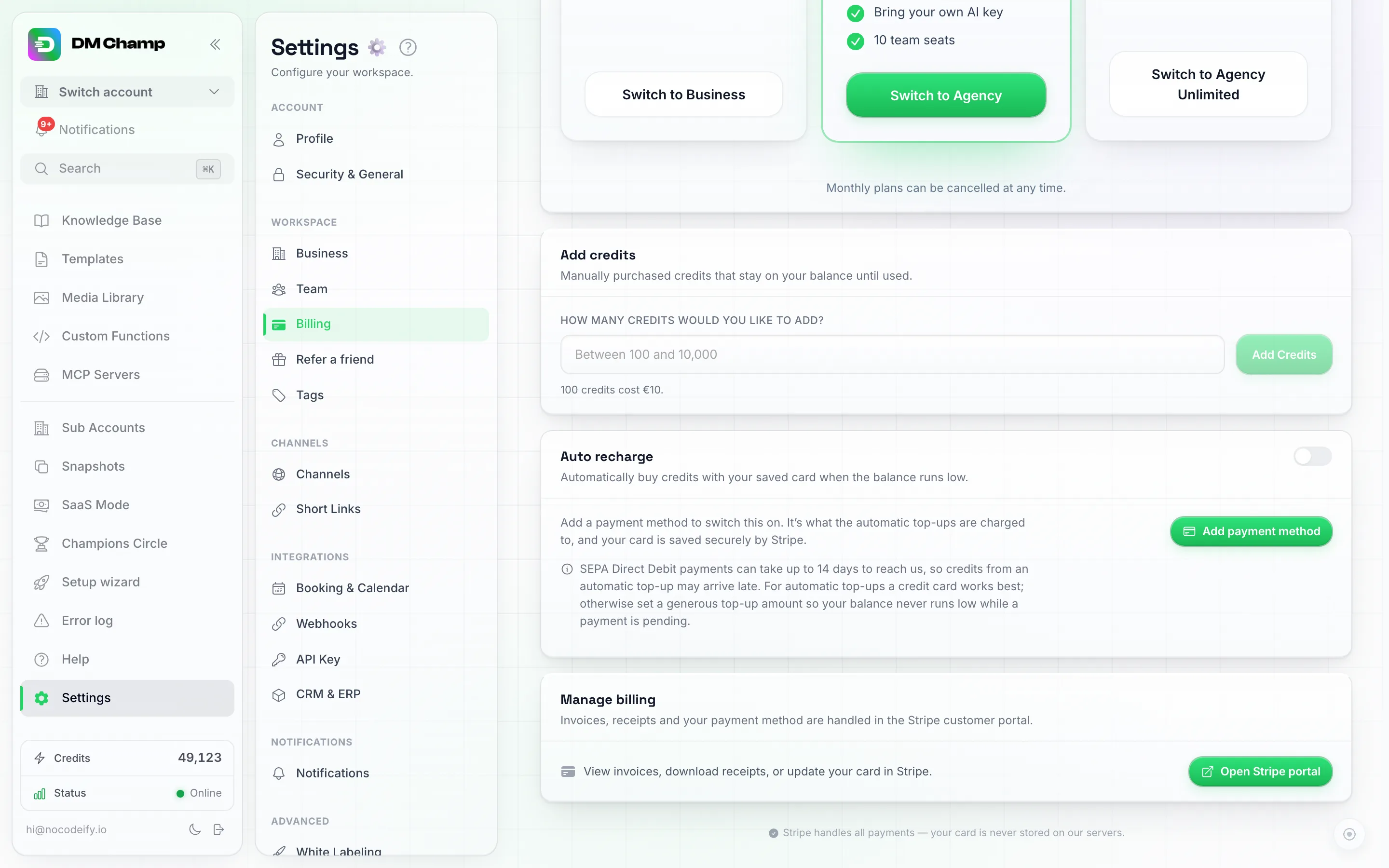
The Manage billing card, at the bottom of the Billing page. Cancel subscription starts the cancel steps; Open Stripe portal is where you update your card, change plan or download invoices.
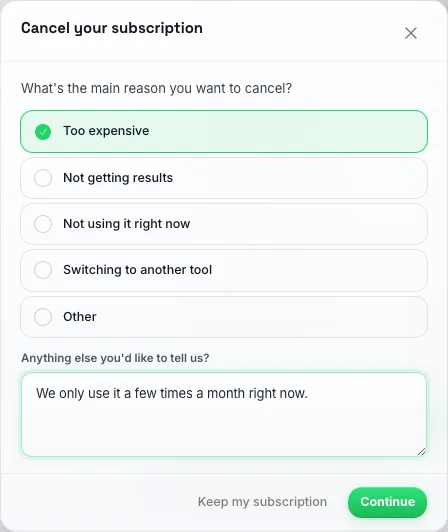
The first step of Cancel subscription: pick the reason that fits best.
Pausing Instead of Cancelling
If you just need a break and you pay monthly, you can pause your subscription for 1, 2 or 3 months instead. Yearly plans can’t be paused. Click Cancel subscription in Settings → Billing, pick Not using it right now, and choose how long.
- While paused, your agents stop replying and nothing is sent from your account.
- You aren’t billed during the pause. Billing restarts automatically on the resume date shown in Settings → Billing.
- Want to come back sooner? Click Resume now in the same place and everything starts again straight away.
- Phone numbers you rent from us are kept while you’re paused. Their monthly rent isn’t charged, the paused time doesn’t count as unpaid rent, and a number isn’t released for sitting unused. Rent picks up again after the pause ends.
- On an agency plan, your client accounts’ monthly credit allowance doesn’t refill during the pause. The refill runs by itself shortly after the pause ends.
Who Doesn’t See the Cancel Button
- Lifetime (AppSumo) plans don’t have a subscription to cancel, so the button isn’t shown. If you moved a lifetime plan to a monthly plan and that monthly plan later ends, your lifetime plan comes back on its own.
- Client accounts of an agency don’t see it either. Their billing is handled by their agency, so they should contact the agency to cancel or change their plan.
Important: When downgrading, make sure your current usage fits the new plan’s limits. For example, moving from Agency to Business means giving up white-labeling and your client accounts, so sort those out before you switch.
Plans We No Longer Sell
Note: the Starter, Growth, Pro and Agency plans referenced in older articles and emails were retired in August 2026 and no longer represent current pricing. Existing subscribers keep the plan they are on, at the price they pay, with everything it includes. Current plans (Business, Agency, Agency Unlimited) are at dmchamp.com/pricing.
If you’re on one of those older plans and happy, there is nothing you need to do.
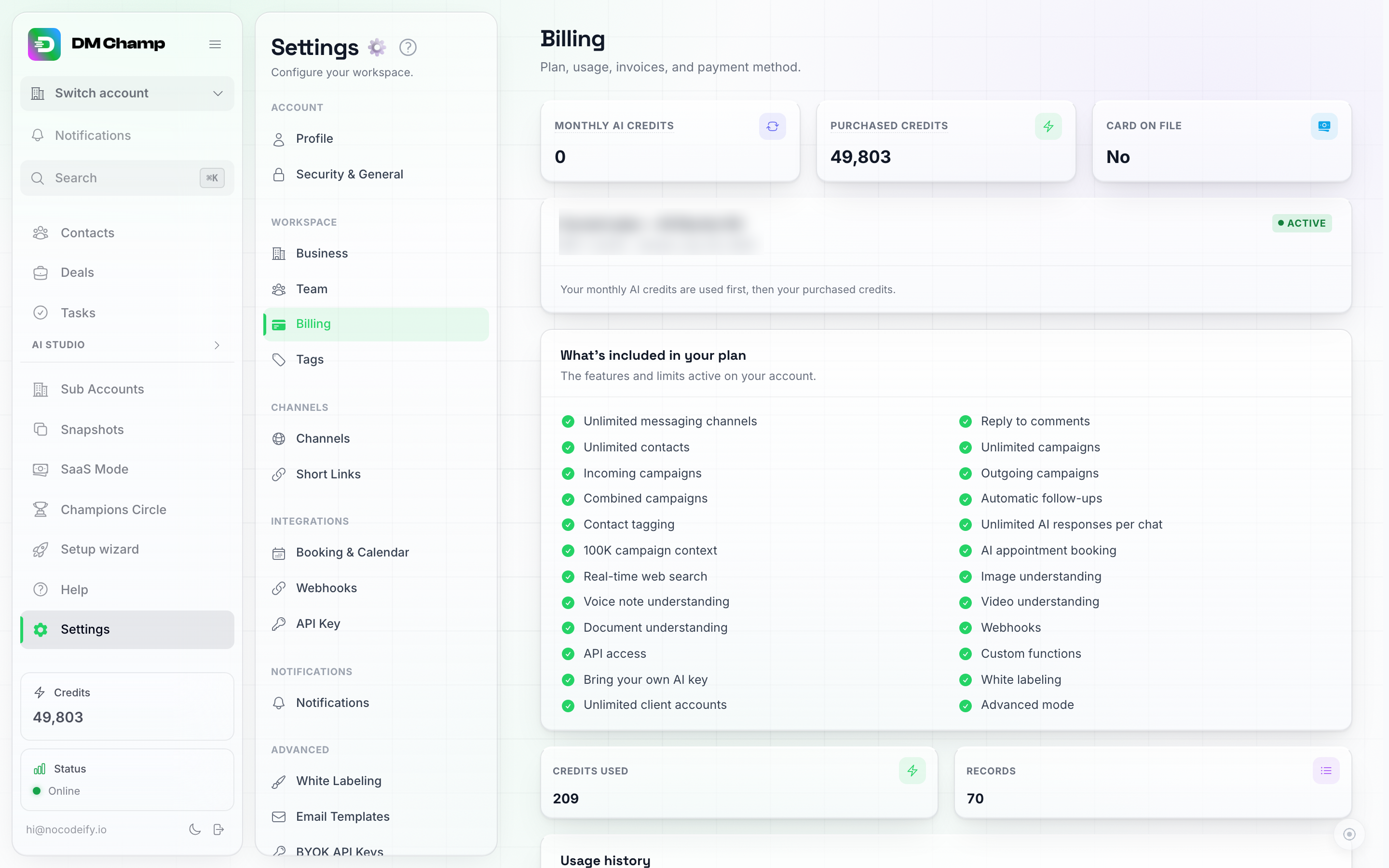
The top of Billing shows your monthly AI credits, your purchased credits and the plan you're on.
Need Help Choosing a Plan?
If you’re unsure which plan is right for you, reach out via our email support and we’ll help you find the best fit.