エラーログ
エラーログは、アカウントで発生した「うまくいかなかったこと」を時系列順に並べたリストです。配信できなかったメッセージ、送信されなかったAIの返信、接続が切れたチャネル、途中で失敗したインポートなどが記録されます。
すべてのエントリーには、短いコード、平易な言葉による説明、そして対処方法が記載されています。そのため、何かがおかしいと感じたときに、サポートに問い合わせて回答を待つことなく、自分で原因を確認して修正することができます。また、実際に問題が発生したのか、それとも正常な動作(連絡先がオプトアウトした、返信可能期間が終了したなど)なのかを判断する最も迅速な方法でもあります。
どこにあるか
画面左側のメインメニューの一番下にあるエラーログをクリックしてください。ヘルプのすぐ上にあります。(スマートフォンの場合は、まずメニューアイコン**☰**をタップしてから、エラーログをタップしてください。)
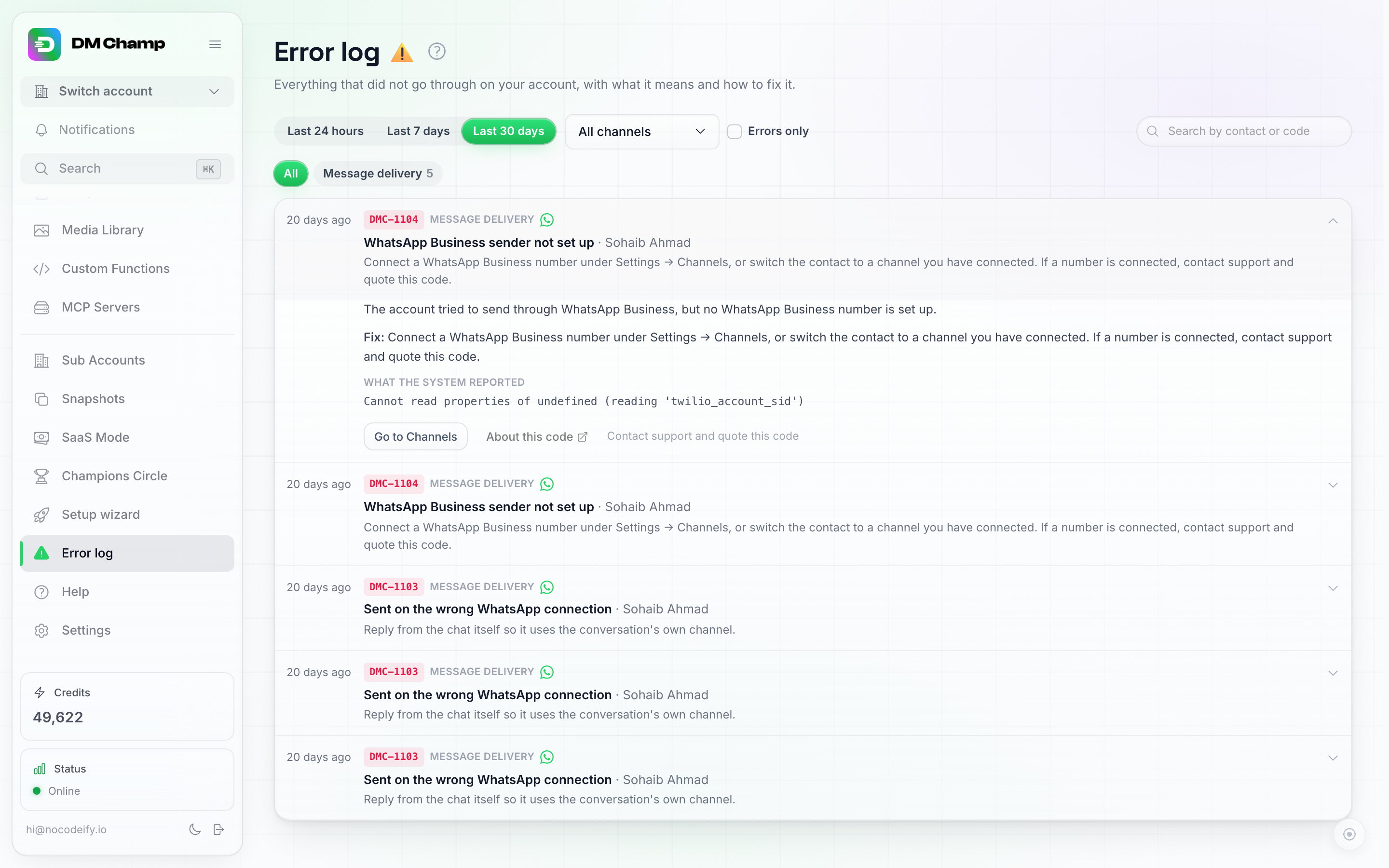
各行にはコード、発生した事象、修正方法が記載されています。行を展開すると、プロバイダー独自のメッセージと、修正を行う場所へのショートカットボタンが表示されます。
行の見方
各行は失敗した1つの事象を表しており、新しい順に表示されます。
| 行の項目 | 内容 |
|---|---|
| 時間 | 発生してからの経過時間。マウスを合わせると正確な日時が表示されます。 |
| コード | この種のエラーを示す短いコード(例: TW-63016)。クリックするとコピーできます。すべてのコードの詳細は以下で説明しています。 |
| カテゴリとチャネル | どの領域(配信、AI、チャネル、請求など)に属するか、およびどのチャネルで発生したかを示します。 |
| 発生したこと | 失敗の内容を1行で表示します。連絡先がある場合は、その連絡先へのリンクが含まれます。 |
| 対処方法 | 修正方法を1行で表示します。 |
行をクリックすると詳細が表示されます。展開された行には、完全な説明、プロバイダーからのメッセージ(ある場合)、プロバイダー独自の数値コード、および修正画面へ直接移動できるボタン(チャットを開く、チャネルへ移動など)が追加されます。このコードについてをクリックすると、このページの該当するコードの説明箇所が開きます。
フィルター
リストの上部で、表示内容を絞り込むことができます。
- 期間 — 24時間、7日間、30日間から選択できます。デフォルトは7日間で、選択した範囲が記憶されます。
- カテゴリチップ — カテゴリごとにチップが表示され、範囲内のエントリー数が示されます。クリックするとそのカテゴリのみが表示されます。
- チャネル — WhatsAppやInstagramなど、特定のチャネルにリストを絞り込みます。
- エラーのみ — 警告や情報のみのエントリーを非表示にし、実際に失敗したものだけを表示します。
- 検索 — 連絡先の名前や番号、またはコードを入力して、特定のエントリーを検索します。
ログの対象範囲
- 配信できなかったメッセージ(すべてのチャネル:WhatsApp Business、WhatsApp Web、SMS、Instagram、Messenger、Telegram、メール)。配信失敗時のメール通知には、連絡先とその番号、複数のアカウントを管理している場合は発生したアカウント名が記載されており、そのチャットに直接移動できる会話を開くボタンが含まれています。
- AIが返信しなかった回数とその理由:回答するエージェントが設定されていない、クレジットが不足した、制限に達した、スケジュール時間外であった、または再試行してもAIが返信を生成できなかった場合など。
- チャネルの問題:WhatsApp Webセッションの切断、ログインの有効期限切れ、送信制限への到達など。
- 請求と制限:支払いの延滞、送信の一時停止、クレジット残高不足、連絡先制限への到達など。
- ナレッジベースのインポートの失敗。
- ブロードキャスト(従来のキャンペーンエントリを含む)の自動一時停止。
- 自動化の実行におけるエラー停止。
- Webhookの失敗、または繰り返される失敗による無効化。
- ルームカレンダーの読み取り失敗。
対象外となるもの
- 正常に動作したもの。 ログには失敗のみが記録されるため、ページが空であれば問題ありません。
- プラットフォーム全体での障害。 関連性のない複数の事象が同時に失敗している場合は、まずシステムステータスを確認してください。
- ブロードキャストの受信者ごとの結果。 ブロードキャスト全体のパフォーマンスについては、ブロードキャスト自体を開いて確認してください(ブロードキャストを参照)。
APIを通じたログの読み取り
同じエントリは GET /v1/error-log のAPI経由で利用可能であり、MCPサーバーに接続されたAIアシスタントからは list_error_log_entries ツールとして利用できます。
代理店アカウントは sub_account_id を渡すことで、代理店自身のAPIキーを使用してクライアントアカウントのエラーログを読み取ることができます(代理店向けAPIを参照)。
サポートへの問い合わせが必要な場合
ほとんどのエラーは、何を修正すべきかが明記されているため、ご自身で対応可能です。問い合わせを促すメッセージが表示された場合や、修正を行っても同じコードが繰り返し発生する場合は、サポートへご連絡ください。その際、エラーコードと発生時刻(該当行から直接コピーしてください)を併せてお知らせください。通常、これだけでやり取りを重ねることなく原因を特定できます。
すべてのエラーコード
コードの最初の部分は、障害の発生元を示しています:
- TW — Twilio。WhatsApp BusinessおよびSMSのプロバイダーです。その後の番号はTwilio独自のエラーコードです。
- META — Meta経由のWhatsApp Business。番号はMeta独自のエラーコードです。
- WAW — WhatsApp Web。
- APP — DM Champ独自のコード。プロバイダーから番号が提供されなかったすべての事象に使用されます。
以下の各コードにはリンクが設定されており、アプリ内の「このコードについて」をクリックすると、該当する項目へ直接移動します。
WhatsApp Business (Twilio)
| Code | What it means | What to do |
|---|---|---|
TW-63005 |
WhatsApp rejected the message content. WhatsApp rejected the content of this message. | Check the message text, any media, and the template’s header and variables, then send again. |
TW-63007 |
Sender number is not connected. This message was sent from a number that is not connected as a WhatsApp sender. | Reconnect the number under Settings → Channels, then try again. |
TW-63012 |
Temporary WhatsApp problem. WhatsApp had a temporary problem on their side. | Try sending again in a few minutes. |
TW-63016 |
24-hour reply window closed. The 24-hour reply window with this contact has closed, so a free-form message cannot be delivered. | Send an approved template to reopen the conversation. |
TW-63021 |
Content not accepted by WhatsApp. The content did not pass WhatsApp’s checks: an unsupported message type, media that is too large or not publicly reachable, or a header or button text over the length limit. | Check that media links open in a private browser window, shorten button labels, and keep template bodies under 1,024 characters. |
TW-63024 |
Number cannot receive WhatsApp messages. This number cannot receive WhatsApp messages. It may not be on WhatsApp, or the person has not accepted WhatsApp’s latest terms. | Confirm the number with the contact, or reach them by SMS or email. |
TW-63027 |
Template not available in this language. The template does not exist in the language it was sent in. | Pick a template approved in the contact’s language, or create one in that language under Templates. |
TW-63032 |
Blocked by a Meta experiment. WhatsApp will not deliver to this number because Meta has included it in a platform experiment. | There is nothing to fix on your side. Reach the contact on another channel if it is urgent. |
TW-63049 |
Marketing template blocked by Meta. Meta blocked this marketing template. Marketing templates can no longer be delivered to US numbers. Elsewhere this is usually a temporary cap on how many marketing messages that person can receive. | For US contacts use SMS or email. For other countries, try again later. |
TW-63050 |
Contact opted out of marketing. This person opted out of marketing messages from your business on WhatsApp. | They will not receive marketing templates again until they opt back in. Utility and service messages still work. |
TW-63051 |
WhatsApp sender locked by Meta. Meta has locked this WhatsApp sender, so it cannot send. The number’s card under Settings → Channels shows it as offline. | Open Business Support Home in Meta Business Suite (the business portfolio that owns the WhatsApp Business Account) to see why and request a review, and finish business verification if Meta asks for it. The number comes back on its own once Meta lifts the lock. |
TW-63058 |
Country not allowed for business messaging. WhatsApp does not allow business messaging to recipients in this country. | Reach the contact by SMS or email. |
TW-21211 |
Invalid phone number. The contact’s phone number is not a valid number: a missing country code, a typo, or extra digits. | Open the contact and correct the number in international format, for example +14155551234. |
TW-21212 |
No approved sender on this account. The number this message was sent from is not an approved WhatsApp sender, so the provider refused it. | Open Settings → Channels and check your WhatsApp Business number is connected and approved. If it shows as connected, contact support and quote this code. |
TW-21408 |
Destination country not enabled. Sending to the contact’s country is switched off on the sending account. | For SMS with your own Twilio account, enable the country under Messaging → Settings → Geo Permissions in the Twilio Console. For WhatsApp, contact support. |
TW-21602 |
Empty message. The message had no text, so it could not be sent. | Add text to the message and send again. |
TW-21610 |
Contact replied STOP. This person texted STOP to your number, so carriers block further texts to them. | Remove them from your lists. They can text START to your number to opt back in. |
TW-21656 |
Template variables do not match. The values filled into the template did not match its placeholders: a missing or empty value, or a value with line breaks. | Check every variable has a value and no line breaks, then resend. |
TW-21703 |
No sender available for this destination. The account has no sender that can reach this contact’s country with this type of message. | Check the number under Settings → Channels. If it is connected and approved, contact support and quote this code. |
SMS (Twilio)
WhatsApp Business (Meta)
| コード | 意味 | 対処法 |
|---|---|---|
META-131026 |
メッセージを配信できません。 WhatsAppはこのメッセージを配信できませんでした。番号がWhatsAppに登録されていない、相手が最新の利用規約に同意していない、またはアプリが非常に古い可能性があります。 | 連絡先に番号を確認するか、別の方法で連絡してください。 |
META-131047 |
24時間の返信ウィンドウが終了しました。 連絡先からの最後のメッセージから24時間以上経過したため、自由形式のメッセージは配信できません。 | 承認済みのテンプレートを送信して、会話を再開してください。 |
META-131049 |
Metaがマーケティングメッセージを保留しました。 エンゲージメントを健全に保つため、Metaはこのマーケティングメッセージを配信しませんでした。連絡先は、現時点でマーケティングメッセージの受信上限に達しています。 | この連絡先にマーケティングテンプレートを再度送信するまで、少なくとも24時間待ってください。 |
META-131053 |
メディアをアップロードできませんでした。 このメッセージに添付されたメディアをWhatsAppにアップロードできませんでした。 | ファイルタイプがサポートされているか、リンクが公開されているかを確認してから再送信してください。 |
META-131056 |
この連絡先へのメッセージが多すぎます。 短期間にこの連絡先へメッセージを送信しすぎました。 | 少し時間を置いてから、再度メッセージを送信してください。 |
META-132000 |
テンプレート変数が一致しません。 テンプレートに入力された値の数が、テンプレートのプレースホルダーと一致しません。 | すべてのプレースホルダーに値があることを確認してから再送信してください。 |
META-132001 |
テンプレートが見つからないか、承認されていません。 この言語のテンプレートが存在しないか、まだ承認されていません。 | 「テンプレート」から、連絡先の言語で承認されたテンプレートを選択してください。 |
META-132015 |
低品質のためテンプレートが一時停止されました。 品質評価が低いため、Metaはこのテンプレートを一時停止しました。 | テンプレートを編集して改善し、再提出してください。その間は、別の承認済みテンプレートを使用してください。 |
META-130472 |
Metaの実験によりブロックされました。 プラットフォームの実験の一環として、Metaはこのメッセージを送信しませんでした。 | ユーザー側で修正できることはありません。 |
META-133010 |
番号がWhatsApp Businessに登録されていません。 送信元番号がWhatsApp Businessプラットフォームに登録されていません。 | 「設定」→「チャネル」から番号を再接続してください。それでも解決しない場合は、サポートへ連絡してください。 |
MessengerおよびInstagram
| コード | 意味 | 対処法 |
|---|---|---|
APP-1901 |
Facebookページの自動化の競合。 他のアプリやFacebook独自の自動応答が現在この会話を制御しているため、Facebookがこの返信を許可しませんでした。 | Facebookページの設定でFacebookの自動応答をオフにし、「ページ設定」→「高度なメッセージング」→「ハンドオーバープロトコル」を開きます。Messengerレシーバー(またはInstagramレシーバー)の横にある「設定」をクリックして、接続されているアプリをプライマリレシーバーにしてください。その後、再度返信してください。 |
APP-1902 |
Metaの24時間ウィンドウが終了しました。 InstagramとMessengerでは、連絡先からの最後のメッセージから24時間以内の返信のみが許可されています。この連絡先は1日以上やり取りがないため、Metaがメッセージをブロックしました。 | 連絡先から再度メッセージが来るのを待ってください。これらのチャネルにはテンプレートが存在しません。急ぎの場合は、WhatsApp、SMS、またはメールで連絡してください。 |
APP-1903 |
コメントには既にプライベート返信があります。 Metaはコメントごとに1件のプライベート返信を許可しており、このコメントには既に返信済みです。 | 修正の必要はありません。代わりに連絡先のDMスレッドで会話を続けてください。 |
APP-1904 |
コメントが利用できません。 コメントが削除されたか、プライベート返信を行うには古すぎます(Instagramは7日以内のプライベート返信を許可しています)。 | 修正の必要はありません。 |
APP-1905 |
FacebookまたはInstagramの権限が不足しています。 接続に必要な権限が不足しているため、Metaがメッセージを拒否しました。 | 「設定」→「チャネル」からアカウントを再接続し、すべての権限を許可してください。Instagramの場合は、アカウントがFacebookページにリンクされたプロフェッショナルアカウントであること、およびInstagramアプリで「メッセージへのアクセスを許可」がオンになっていることも確認してください。 |
APP-1906 |
FacebookまたはInstagramのログインの有効期限が切れました。 このページまたはInstagramアカウントのログイントークンの有効期限が切れたか、取り消されたため、送信できません。 | 「設定」→「チャネル」からアカウントを再接続してください。 |
APP-1907 |
連絡先に到達できません。 Metaがこの会話または人物を見つけられません。相手があなたをブロックしたか、アカウントを削除したか、会話を削除した可能性があります。 | 修正の必要はありません。 |
APP-1908 |
Metaの一時的なエラー。 Meta側で一時的な問題が発生しました。 | 数分待ってから再試行してください。 |
APP-1909 |
Metaがこのメッセージを拒否しました。 展開された行に表示されている理由により、Metaがこのメッセージを拒否しました。 | 詳細を確認してください。不明な場合は、サポートに連絡し、このコードを伝えてください。 |
WhatsApp Web
| コード | 意味 | 対処法 |
|---|---|---|
WAW-463 |
WhatsAppがこの連絡先へのメッセージを制限しています。 相手がこの番号をブロックしているか、このアカウントからまだ許可されていない新しい会話である可能性があります。 | 時間を置いてから再度試すか、別の方法で連絡してください。新しい番号は徐々に慣らしていく必要があります。 |
WAW-479 |
一時的なWhatsApp接続の問題です。 | 再度送信を試してください。 |
APP-1101 |
WhatsApp Webが接続されていません。 メッセージ送信時にWhatsApp Webの接続が切れていたため、送信できませんでした。 | 「設定」→「チャネル」を開き、「再接続」をクリックして、スマートフォンでQRコードをスキャンしてください。その後、メッセージを再送してください。 |
APP-1102 |
WhatsApp番号が接続されていません。 このアカウントには接続されたWhatsApp番号がないため、メッセージの送信先がありません。 | 「設定」→「チャネル」から番号を接続してください。 |
APP-1103 |
誤ったWhatsApp接続で送信されました。 この会話はWhatsApp Web番号で行われていますが、メッセージはWhatsApp Business経由で送信されました。 | 会話自体から返信して、その会話専用のチャネルを使用するようにしてください。 |
APP-1104 |
WhatsApp Businessの送信者が設定されていません。 アカウントがWhatsApp Business経由で送信しようとしましたが、WhatsApp Business番号が設定されていません。 | 「設定」→「チャネル」からWhatsApp Business番号を接続するか、接続済みのチャネルに連絡先を切り替えてください。番号が接続されている場合は、サポートに連絡し、このコードを伝えてください。 |
APP-1105 |
WhatsAppがメッセージを確認しませんでした。 メッセージはWhatsApp Webに渡されましたが、WhatsAppから受信確認がなかったため、相手に届いていない可能性が高いです。これは通常、送信中にWhatsApp Webの接続が一時的に切断されたことを意味します。 | 「設定」→「チャネル」でWhatsApp Web番号が接続済みと表示されていることを確認し、メッセージを再送してください。 |
APP-1201 |
無効な電話番号です。 連絡先の電話番号を検証できませんでした。 | 連絡先を開き、国際形式で番号を修正してください。 |
APP-1301 |
1日の新規連絡先制限に達しました。 (警告) このWhatsApp Web番号は、これまで一度もやり取りしたことのない相手へのメッセージ送信制限に達しました。この制限は、番号が禁止されるのを防ぐためのものです。 | 明日までお待ちください。制限は番号の利用実績が増えるにつれて緩和されます。WhatsAppアウトリーチを安全に拡大する方法を参照してください。 |
APP-1401 |
承認済みテンプレートが添付されていません。 承認されていないテンプレートを使用してテンプレートメッセージが送信されました。 | 「テンプレート」から承認済みのテンプレートを選択して再送してください。 |
その他のチャネル
| コード | 意味 | 対処法 |
|---|---|---|
APP-1501 |
メールアドレスが拒否されました。 受信側のメールサーバーがアドレスを拒否しました。 | 連絡先のメールアドレスに誤字がないか確認してください。 |
APP-1502 |
メール受信トレイが接続されていません。 このアカウントには、送信元となる接続済みのメール受信トレイがありません。 | 「設定」→「チャネル」→「メール」から接続してください。 |
APP-1503 |
メールを送信できませんでした。 展開された行に表示されている理由により、メールを送信できませんでした。 | 「設定」→「カスタムメールプロバイダー」でメールプロバイダーの設定を確認してください。 |
APP-1601 |
Telegramセッションの有効期限が切れました。 このアカウントのTelegramログインが終了しました(通常、Telegramアプリのアクティブなセッションから終了されたことが原因です)。 | 「設定」→「チャネル」からTelegramを再接続してください。 |
APP-1602 |
Telegramでブロックされています。 どちらか一方がTelegramで相手をブロックしているため、メッセージを配信できません。 | ここで修正できることはありません。 |
APP-1603 |
Telegramメッセージの送信に失敗しました。 Telegramがこのメッセージを受け付けませんでした。 | 再試行してください。繰り返される場合は、「設定」→「チャネル」からTelegramを再接続してください。 |
APP-1701 |
SMSが設定されていません。 このアカウントにはSMS送信元が接続されていません。 | 「設定」→「SMSプロバイダー」からTwilioアカウントまたはAndroidスマートフォンを接続してください。 |
APP-1001 |
Skoolアカウントの再接続が必要です。 このチャットを実行しているSkoolアカウントからサインアウトされたため、メッセージが送信されませんでした。 | 「設定」→「チャネル」からSkoolアカウントを再接続し、メッセージを再送信してください。 |
APP-1002 |
新しいSkoolチャットの制限に達しました。 この新しいSkoolチャットを開始すると、1時間あたりの新規チャット数、1日あたりの制限、またはSkool独自の週次制限を超えてしまいます。 | しばらく待ってから再送信してください。既存のチャットへの返信には影響しません。 |
APP-1003 |
メンバーがチャットをオフにしています。 このメンバーはSkoolでダイレクトメッセージをオフにしています。 | 代わりにコミュニティ内で返信するか、相手からのメッセージを待ってください。 |
APP-1004 |
Skoolがチャットを開始できませんでした。 Skoolはこのメンバーとの新しいダイレクトメッセージチャットを開始できませんでした。 | コミュニティ内で返信するか、相手からメッセージが来るのを待ってください。 |
APP-1005 |
コメントは利用できません。 この返信対象のコメントまたは投稿が削除されたか、Skool接続でコミュニティが選択されていません。 | Skoolで投稿を確認し、まだ存在する場合はそこで返信してください。Skoolチャネル設定でコミュニティが選択されていることを確認してください。 |
APP-1006 |
Skoolがメッセージを受け付けませんでした。 Skoolがこのメッセージを拒否しました。 | リンクなど、Skoolがブロックする可能性のあるものが含まれていないかメッセージを確認し、再送信してください。繰り返される場合は、サポートへお問い合わせください。 |
APP-2001 |
送信が一時停止されています:請求。 未払いの請求書またはブロックされたサブスクリプションのため、送信メッセージが一時停止されています。 | 「設定」→「請求」から支払いを完了してください。送信は自動的に再開されます。 |
APP-9001 |
配信に失敗しました。 メッセージを配信できませんでした。プロバイダーによる理由がある場合は、展開された行に表示されます。 | 再試行してください。解決しない場合は、このコードと時刻を添えてサポートへお問い合わせください。 |
AI
| Code | What it means | What to do |
|---|---|---|
APP-3001 |
No AI agent answered a new message. A message came in but no active AI agent was set to answer on that channel, so nobody replied. The message is in your inbox. | Open AI Agents and switch an agent on, or assign one to that channel’s entry point. |
APP-3002 |
AI paused: no credits left. The AI did not reply because the account ran out of credits. | Top up or enable auto-recharge under Settings → Billing. |
APP-3003 |
AI paused: billing. The AI did not reply because the subscription is blocked for billing. | Settle the payment under Settings → Billing. |
APP-3004 |
Your AI key failed and fallback is off. Your own AI provider key returned an error and fallback to the platform’s AI is switched off, so no reply was generated. | Fix the key under Settings → AI Model, or switch fallback on. |
APP-3101 |
Your AI provider key has a problem. Your own AI provider key was rejected. Your bots keep working on the platform’s AI in the meantime. | Check the key and the provider’s billing under Settings → AI Model. |
APP-3103 |
A long-running function never sent its result. The AI started a job through a custom function set to “Result comes later”, but the service never posted the result to the callback link before it expired. The AI was told the result never came. | Check the service’s logs for the call, make sure it posts to the exact callback link from the request, and raise “Wait up to” on the function if the job can take longer. |
APP-3201 |
Bot stopped: message cap reached for this contact. (warning) The AI reached the maximum number of messages allowed for this contact and stopped. | Take over the chat, or raise the per-contact message limit in the agent’s settings. |
APP-3301 |
AI skipped: outside active hours. (information only) The message arrived outside the bot’s availability schedule. | Adjust the schedule under the agent’s Availability if it should have answered. |
APP-3302 |
AI skipped: keyword trigger. (information only) The contact’s message matched a keyword that pauses the AI. | Review the pause keywords in the agent’s settings. |
APP-3303 |
AI skipped: contact opted out. (information only) This contact is excluded from the AI. | Remove the exclusion on the contact if that was not intended. |
APP-3304 |
AI skipped: Instagram story reply. (information only) Replies to Instagram stories are switched off for this agent. | Turn on story replies in the agent’s Instagram settings if you want them answered. |
APP-3305 |
AI skipped: shared post or Reel. (information only) Someone sent a post or Reel on its own, with nothing written next to it, and replies to those are switched off for this agent. | Turn on Instagram post and Reel shares in the agent’s settings if you want these answered. |
APP-3306 |
AI could not reply. The AI agent could not produce a reply to this message, even after retrying automatically, so the message was left unanswered. | Reply to the customer yourself, or wait for their next message. |
APP-3307 |
Follow-up skipped: no approved template. The follow-up after 24 hours was not sent because this agent has no approved follow-up template for that cycle. After 24 hours, WhatsApp only allows approved templates. This applies to the WhatsApp Business API; other channels send an AI-written follow-up instead. | Generate templates in the agent’s Follow-ups tab and wait until they are approved. |
APP-3308 |
AI paused for the whole account. (information only) The AI did not reply because AI replies are paused for your whole account. | Click Resume AI in the banner at the top of the app when you want the AI to answer again. |
APP-3309 |
Daily WhatsApp Web limit reached. The AI did not reply because this WhatsApp Web number reached its daily message limit. | Nothing to do: the AI answers this message automatically after the limit resets at 00:00 UTC. You can still reply from WhatsApp on your phone. |
APP-3310 |
Not answered: agent in test mode. (information only) The AI did not reply because this agent is in test mode and only answers the contacts on its test mode list. | Add this contact to the agent’s test mode list, or turn test mode off to let the AI answer everyone. |
APP-3311 |
AI reply limit reached in this chat. This chat reached the most AI replies your plan allows in one chat, so the AI was switched off for this chat. | Reply yourself, or upgrade your plan to allow more AI replies per chat. |
APP-3312 |
AI chose not to reply. (information only) The AI read this message and decided it did not need a reply, so nothing was sent to the contact. | Nothing to do if no reply was needed. If one was, reply yourself, or tell the agent in its instructions when it should always answer. |
APP-3313 |
Monthly budget for the AI key reached. The AI did not reply because the AI key this account uses reached the monthly spending budget set for it, so nothing was sent to the contact. This note appears at most once a day per chat. | Raise or remove the BYOK monthly budget. For a client account the agency sets it under Sub-accounts, by editing the client. Otherwise the AI replies again once the monthly usage resets. |
APP-3314 |
Group message not addressed to the AI. (information only) A member wrote in a WhatsApp group where the AI is on, but did not mention your number or reply to one of its messages, so the AI stayed out of it. | Nothing to do if the message was not for you. To have the AI answer, the member mentions your number or replies to one of the AI’s messages. Reply yourself if needed. See WhatsApp Groups. |
APP-3315 |
Automatic DM not sent again. (information only) An automatic DM, like comment to DM or a keyword reply, was not sent because this person already got the same message recently. This keeps people who comment again and again from getting the same DM each time. | Nothing to do for real customers. If this is your own account and you are testing, open the chat and turn on Test contact in the side panel: automatic DMs then go out every time for that contact. See Testing Comment to DM. |
APP-3316 |
Follow-up skipped: a template variable had no value. A scheduled follow-up (a warm cycle, a cold-lead follow-up, a follow-up a broadcast scheduled, or a quick follow-up set to fixed text) uses a variable, like {{business_name}}, that this contact has no value for, and the template gives no default; or the template contains a conditional block like {{if:company}}, which follow-up templates do not support. That one follow-up was skipped and the next one in the sequence was scheduled as normal. |
Give the variable a default in the follow-up template, written `{{business_name |
APP-3317 |
AI skipped: Instagram story mention. (information only) Someone tagged your business in their Story, and replies to story mentions are switched off for this agent. | Turn on Instagram story mentions in the agent’s settings if you want them answered. |
AIから返信がない場合、自動的に数回再試行されます。それでも返信できない場合は、会話に注記が表示され、エラーログに APP-3306 エントリが記録されます。エージェントが人間に引き継いだチャット(チームメンバーに通知した場合、またはチャットを終了した場合)はカウントされません。この場合、AIは意図的に沈黙しているため、注記や APP-3306 エントリは作成されません。
チャネル数
請求と制限
ナレッジベース
| コード | 意味 | 対処法 |
|---|---|---|
APP-4001 |
ナレッジベースのインポートに失敗しました。 インポート元のページを読み取れませんでした。 | ウェブサイトが公開されている(ログイン制限がない)ことを確認し、「ナレッジベース」でインポートを再試行してください。 |
ブロードキャストとキャンペーン
| コード | 意味 | 対処方法 |
|---|---|---|
APP-5101 |
エージェントが自動的に一時停止されました。 返信率が低く、番号がリスクにさらされる可能性があるため、エージェントは新規ユーザーへのメッセージ送信を停止しました。 | エージェントの連絡先と最初のメッセージを確認し、エージェントのページから再度有効にしてください。 |
APP-5102 |
送信ガードがブロードキャストを停止しました。 メッセージを一度も送ったことのないユーザーに送信しようとしていたため、番号を保護するためにブロードキャストが停止されました。 | 対象ユーザーを確認し、ブロードキャストページから再開してください。 |
APP-5103 |
送信ガードの警告。 (警告) ブロードキャストが、メッセージを一度も送ったことのない多くのユーザーに送信されています。 | 対象ユーザーとの関係を維持し、送信量を段階的に増やしてください。WhatsAppアウトリーチを安全に拡大する方法を参照してください。 |
APP-5104 |
ブロードキャストが自動的に一時停止されました。 繰り返される失敗により、ブロードキャストが一時停止されました。 | 配信失敗の原因を修正してから、再開してください。 |
自動化
| コード | 意味 | 対処方法 |
|---|---|---|
APP-5001 |
自動化の対応が必要です。 自動化でアラートが発生し、人の確認が必要な状態です。 | リンク先のチャットまたは自動化を開いてください。 |
APP-5201 |
自動化の実行に失敗しました。 自動化の実行がエラーで停止しました。展開された行にステップのメッセージが表示されます。 | 実行内容を開いてどのステップで失敗したかを確認し、設定を修正して再実行してください。このような場合に通知を受け取るには、通知設定で 自動化の失敗 をオンにしてください。 |
統合
| コード | 意味 | 対処法 |
|---|---|---|
APP-6001 |
Webhookの配信に失敗しました。 Webhookエンドポイントが配信を拒否しているか、タイムアウトが発生しています。展開された行に最後のレスポンスが表示されます。 | エンドポイントが稼働しており、2xxステータスを迅速に返しているか確認してください。 |
APP-6002 |
Webhookが繰り返し失敗したため無効化されました。 失敗が続いたため、Webhookはオフになりました。イベントは配信されていません。 | エンドポイントを修正してから、Webhookを再度有効にしてください。URLを変更して編集・保存するか、API経由で再有効化エンドポイントを呼び出してください。同じURLで再保存するだけでは不十分です。Webhooksを参照してください。 |
予約
| コード | 意味 | 対処方法 |
|---|---|---|
APP-7001 |
会議室カレンダーを読み取れません。 会議室にリンクされているGoogleカレンダーを読み取れなかったため、その会議室の空き状況が正しく表示されない可能性があります。 | 接続されているGoogleアカウントでカレンダーを再共有するか、Googleカレンダーを再接続してください。 |