错误日志
错误日志是一个按时间排序的列表,记录了您账户中所有未成功执行的操作:无法送达的消息、未发出的 AI 回复、断开连接的渠道、中途失败的导入等。
每一条记录都包含一个简短的代码、通俗易懂的解释以及处理建议。因此,当出现异常时,您可以自行查看原因并修复,而无需写信给客服等待回复。这也是区分真实故障与正常行为(例如联系人退订、回复窗口关闭)的最快方法。
在哪里可以找到它
在屏幕左侧的主菜单最底部,点击错误日志,它位于帮助上方。(在手机上,请先点击菜单图标 ☰,然后点击错误日志。)
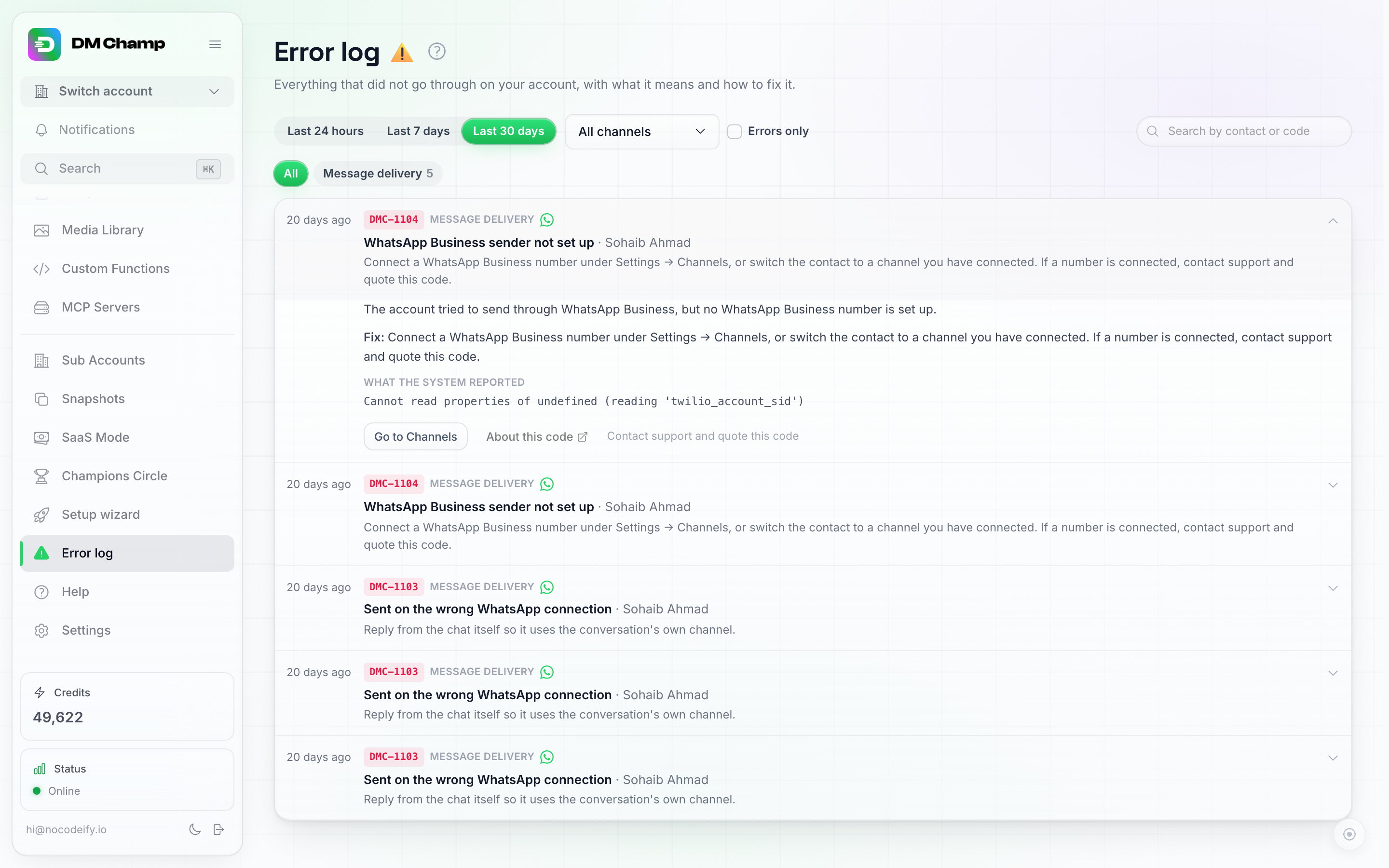
每一行都包含一个代码、发生的情况以及修复方法;展开某一行会显示提供商自己的消息以及指向修复位置的快捷按钮。
阅读记录行
每一行代表一个失败的操作,按时间从新到旧排列。
| 行组成部分 | 说明 |
|---|---|
| 时间 | 发生的时间距离现在多久。将鼠标悬停在上面可查看确切的日期和时间。 |
| 代码 | 此类故障的简短代码,例如 TW-63016。点击即可复制。每个代码的含义均在下方说明。 |
| 类别与渠道 | 所属领域(发送、AI、渠道、账单等)以及发生故障的渠道。 |
| 发生了什么 | 一行简述故障原因,若涉及联系人,则包含指向该联系人的链接。 |
| 如何处理 | 一行修复建议。 |
点击某一行可将其展开。展开后的行会显示完整解释、服务商提供的原始消息(如有)、服务商的原始数字代码,以及可直接跳转至修复页面的按钮,例如打开聊天、前往渠道等。关于此代码会打开本页面并跳转至该代码的条目。
筛选器
在列表上方,您可以进行筛选:
- 时间范围 — 24 小时、7 天或30 天。默认显示 7 天,系统会记住您选择的范围。
- 类别标签 — 每个类别一个标签,并显示该范围内的条目数量。点击可仅显示该类别的记录。
- 渠道 — 将列表限制为特定渠道,例如 WhatsApp 或 Instagram。
- 仅显示错误 — 隐藏警告和仅供参考的条目,仅保留实际失败的操作。
- 搜索 — 输入联系人姓名、号码或代码,以查找特定条目。
日志涵盖的内容
- 无法送达的消息,涵盖所有渠道 — WhatsApp Business、WhatsApp Web、SMS、Instagram、Messenger、Telegram 和电子邮件。发送失败的电子邮件提醒会注明联系人及其号码,在管理多个账户时会注明发生问题的账户,并提供一个打开对话按钮,点击即可进入该聊天界面。
- AI 未回复的情况及其原因 — 未设置代理进行回复、积分用尽、达到限额、不在工作时间,或者 AI 在重试后仍无法生成回复。
- 渠道问题 — WhatsApp Web 会话断开、登录过期、达到发送限额。
- 账单与限额 — 逾期付款、发送已暂停、积分余额不足、达到联系人限额。
- 知识库导入失败。
- 广播(包括经典营销活动条目)被自动暂停。
- 自动化运行因错误而停止。
- Webhook 失败或在多次失败后被关闭。
- 房间日历无法读取。
不涵盖的内容
- 所有成功执行的操作。 日志仅记录失败情况,因此页面为空是好消息。
- 平台级中断。 如果多个不相关的操作同时失败,请先检查系统状态。
- 广播中每个收件人的结果。 若要查看广播的整体发送表现,请打开广播本身 — 参见广播。
通过 API 读取日志
相同的条目可通过 GET /v1/error-log 处的 API 获取,并通过 list_error_log_entries 工具提供给连接到 MCP 服务器的 AI 助手。
代理账户可以使用代理自己的 API 密钥传入 sub_account_id 来读取客户账户的错误日志(请参阅代理 API)。
何时联系客服
大多数条目会明确告诉您需要更改什么,您可以自行处理。当某个条目提示您联系支持团队,或者在您按照修复建议操作后同一代码仍然出现时,请联系支持团队并提供错误代码及发生时间(直接从行中复制)。这通常足以让我们在无需反复沟通的情况下定位问题。
所有错误代码
代码的第一部分说明了故障的来源:
- TW — Twilio,WhatsApp Business 和短信背后的提供商。其后的数字是 Twilio 自己的错误代码。
- META — 通过 Meta 提供的 WhatsApp Business。该数字是 Meta 自己的错误代码。
- WAW — WhatsApp Web。
- APP — DM Champ 自己的代码,用于所有提供商未提供编号的情况。
下方每个代码都有其专属链接,因此应用中的 关于此代码 会直接跳转到对应的条目。
WhatsApp Business (Twilio)
| Code | What it means | What to do |
|---|---|---|
TW-63005 |
WhatsApp rejected the message content. WhatsApp rejected the content of this message. | Check the message text, any media, and the template’s header and variables, then send again. |
TW-63007 |
Sender number is not connected. This message was sent from a number that is not connected as a WhatsApp sender. | Reconnect the number under Settings → Channels, then try again. |
TW-63012 |
Temporary WhatsApp problem. WhatsApp had a temporary problem on their side. | Try sending again in a few minutes. |
TW-63016 |
24-hour reply window closed. The 24-hour reply window with this contact has closed, so a free-form message cannot be delivered. | Send an approved template to reopen the conversation. |
TW-63021 |
Content not accepted by WhatsApp. The content did not pass WhatsApp’s checks: an unsupported message type, media that is too large or not publicly reachable, or a header or button text over the length limit. | Check that media links open in a private browser window, shorten button labels, and keep template bodies under 1,024 characters. |
TW-63024 |
Number cannot receive WhatsApp messages. This number cannot receive WhatsApp messages. It may not be on WhatsApp, or the person has not accepted WhatsApp’s latest terms. | Confirm the number with the contact, or reach them by SMS or email. |
TW-63027 |
Template not available in this language. The template does not exist in the language it was sent in. | Pick a template approved in the contact’s language, or create one in that language under Templates. |
TW-63032 |
Blocked by a Meta experiment. WhatsApp will not deliver to this number because Meta has included it in a platform experiment. | There is nothing to fix on your side. Reach the contact on another channel if it is urgent. |
TW-63049 |
Marketing template blocked by Meta. Meta blocked this marketing template. Marketing templates can no longer be delivered to US numbers. Elsewhere this is usually a temporary cap on how many marketing messages that person can receive. | For US contacts use SMS or email. For other countries, try again later. |
TW-63050 |
Contact opted out of marketing. This person opted out of marketing messages from your business on WhatsApp. | They will not receive marketing templates again until they opt back in. Utility and service messages still work. |
TW-63051 |
WhatsApp sender locked by Meta. Meta has locked this WhatsApp sender, so it cannot send. The number’s card under Settings → Channels shows it as offline. | Open Business Support Home in Meta Business Suite (the business portfolio that owns the WhatsApp Business Account) to see why and request a review, and finish business verification if Meta asks for it. The number comes back on its own once Meta lifts the lock. |
TW-63058 |
Country not allowed for business messaging. WhatsApp does not allow business messaging to recipients in this country. | Reach the contact by SMS or email. |
TW-21211 |
Invalid phone number. The contact’s phone number is not a valid number: a missing country code, a typo, or extra digits. | Open the contact and correct the number in international format, for example +14155551234. |
TW-21212 |
No approved sender on this account. The number this message was sent from is not an approved WhatsApp sender, so the provider refused it. | Open Settings → Channels and check your WhatsApp Business number is connected and approved. If it shows as connected, contact support and quote this code. |
TW-21408 |
Destination country not enabled. Sending to the contact’s country is switched off on the sending account. | For SMS with your own Twilio account, enable the country under Messaging → Settings → Geo Permissions in the Twilio Console. For WhatsApp, contact support. |
TW-21602 |
Empty message. The message had no text, so it could not be sent. | Add text to the message and send again. |
TW-21610 |
Contact replied STOP. This person texted STOP to your number, so carriers block further texts to them. | Remove them from your lists. They can text START to your number to opt back in. |
TW-21656 |
Template variables do not match. The values filled into the template did not match its placeholders: a missing or empty value, or a value with line breaks. | Check every variable has a value and no line breaks, then resend. |
TW-21703 |
No sender available for this destination. The account has no sender that can reach this contact’s country with this type of message. | Check the number under Settings → Channels. If it is connected and approved, contact support and quote this code. |
短信 (Twilio)
WhatsApp Business (Meta)
| 代码 | 含义 | 操作建议 |
|---|---|---|
META-131026 |
消息无法送达。 WhatsApp 无法送达此消息。该号码可能未注册 WhatsApp,用户可能未接受最新条款,或者其应用程序版本过旧。 | 与联系人确认号码,或通过其他方式联系他们。 |
META-131047 |
24 小时回复窗口已关闭。 自联系人上次给您发消息起已超过 24 小时,因此无法发送自由格式消息。 | 发送已批准的模板以重新开启对话。 |
META-131049 |
营销消息被 Meta 拦截。 为保持互动质量,Meta 未发送此营销消息。该联系人目前的营销消息接收额度已达上限。 | 请等待至少 24 小时后再向此联系人发送营销模板。 |
META-131053 |
媒体文件无法上传。 此消息附带的媒体文件无法上传至 WhatsApp。 | 检查文件类型是否受支持且链接可公开访问,然后重新发送。 |
META-131056 |
向此联系人发送的消息过多。 在短时间内向此联系人发送了过多消息。 | 请稍等片刻后再向此联系人发送消息。 |
META-132000 |
模板变量不匹配。 填入模板的值数量与模板的占位符不匹配。 | 检查每个占位符是否有值,然后重新发送。 |
META-132001 |
模板未找到或未获批准。 该语言版本的模板不存在,或者尚未获得批准。 | 在“模板”下选择一个已批准的联系人语言版本模板。 |
META-132015 |
模板因质量低被暂停。 Meta 因质量评分较低而暂停了此模板。 | 编辑模板以改进质量并重新提交;在此期间请使用其他已批准的模板。 |
META-130472 |
被 Meta 实验拦截。 作为平台实验的一部分,Meta 未发送此消息。 | 您无需进行任何修复。 |
META-133010 |
号码未在 WhatsApp Business 注册。 发送号码未在 WhatsApp Business 平台上注册。 | 在“设置”→“渠道”下重新连接该号码。如果问题依旧,请联系支持团队。 |
Messenger 和 Instagram
| 代码 | 含义 | 操作建议 |
|---|---|---|
APP-1901 |
Facebook 页面自动化冲突。 Facebook 阻止了此回复,因为另一个应用程序或 Facebook 自身的自动回复功能目前正在控制此对话。 | 在您的 Facebook 页面设置中,关闭 Facebook 的自动回复,然后打开“页面设置”→“高级消息”→“移交协议”,点击 Messenger 接收器(或 Instagram 接收器)旁边的“配置”,将已连接的应用程序设为主要接收器。然后再次尝试回复。 |
APP-1902 |
Meta 24 小时窗口已关闭。 Instagram 和 Messenger 仅允许在联系人最后一条消息后的 24 小时内进行回复。该联系人已超过一天未发送消息,因此 Meta 拦截了此消息。 | 等待联系人再次发送消息。这些渠道不支持模板消息;如果无法等待,请通过 WhatsApp、短信或电子邮件联系他们。 |
APP-1903 |
评论已有私信回复。 Meta 允许每条评论进行一次私信回复,而此评论已收到过回复。 | 无需操作。请转至该联系人的私信会话中继续交流。 |
APP-1904 |
评论不再可用。 该评论已被删除或因时间过久无法进行私信回复(Instagram 允许在 7 天内进行私信回复)。 | 无需操作。 |
APP-1905 |
缺少 Facebook 或 Instagram 权限。 Meta 拒绝了此消息,因为连接缺少相关权限。 | 在“设置”→“渠道”下重新连接账户并接受所有权限。对于 Instagram,还请检查该账户是否为关联至 Facebook 页面的专业账户,并确保 Instagram 应用中已开启“允许访问消息”。 |
APP-1906 |
Facebook 或 Instagram 登录过期。 此页面或 Instagram 账户的登录令牌已过期或被撤销,因此无法发送任何内容。 | 在“设置”→“渠道”下重新连接账户。 |
APP-1907 |
联系人无法再触达。 Meta 无法再找到此对话或人员。他们可能已屏蔽您、删除了账户或删除了对话。 | 无需操作。 |
APP-1908 |
Meta 临时错误。 Meta 出现了临时性问题。 | 请在几分钟后重试。 |
APP-1909 |
Meta 拒绝了此消息。 Meta 拒绝了此消息,原因显示在展开行中。 | 阅读详细信息;如果不明确,请联系支持团队并提供此代码。 |
WhatsApp Web
| 代码 | 含义 | 操作建议 |
|---|---|---|
WAW-463 |
WhatsApp 正在限制发往此联系人的消息。 他们可能已屏蔽此号码,或者这是一个 WhatsApp 尚不允许此账户发起的新对话。 | 请稍后再试,或通过其他方式联系对方。新号码应逐步建立信誉。 |
WAW-479 |
WhatsApp 连接暂时出现问题。 | 请尝试重新发送。 |
APP-1101 |
WhatsApp Web 未连接。 由于发送时 WhatsApp Web 连接中断,消息未能发出。 | 打开“设置”→“渠道”,点击“重新连接”,然后使用手机扫描二维码。之后重新发送消息。 |
APP-1102 |
未连接 WhatsApp 号码。 此账户未连接任何 WhatsApp 号码,因此消息无法发送。 | 在“设置”→“渠道”下连接一个号码。 |
APP-1103 |
通过错误的 WhatsApp 连接发送。 此对话属于您的 WhatsApp Web 号码,但消息却是通过 WhatsApp Business 发送的。 | 请直接在聊天窗口中回复,以便使用该对话所属的渠道。 |
APP-1104 |
未设置 WhatsApp Business 发送方。 账户尝试通过 WhatsApp Business 发送,但未设置 WhatsApp Business 号码。 | 在“设置”→“渠道”下连接一个 WhatsApp Business 号码,或将联系人切换至您已连接的渠道。如果已连接号码,请联系支持团队并提供此代码。 |
APP-1105 |
WhatsApp 未确认消息。 消息已提交至 WhatsApp Web,但 WhatsApp 未确认接收,因此很可能未送达联系人。这通常意味着 WhatsApp Web 连接在发送时瞬间中断。 | 检查“设置”→“渠道”下 WhatsApp Web 号码是否显示为已连接,然后重新发送消息。 |
APP-1201 |
无效的电话号码。 无法验证联系人的电话号码。 | 打开联系人详情,以国际格式更正号码。 |
APP-1301 |
已达到每日新联系人上限。 (警告) 此 WhatsApp Web 号码已达到今日向从未联系过的人发送消息的上限。此限制旨在保护号码免遭封禁。 | 请等到明天。随着号码信誉的建立,上限会逐渐提高。请参阅安全扩展 WhatsApp 推广范围。 |
APP-1401 |
未附加已批准的模板。 发送的消息未包含已批准的模板。 | 在“模板”中选择一个已批准的模板并重新发送。 |
其他渠道
| 代码 | 含义 | 操作建议 |
|---|---|---|
APP-1501 |
电子邮件地址被拒绝。 收件人的邮件服务器拒绝了该地址。 | 检查联系人的电子邮件地址是否有拼写错误。 |
APP-1502 |
未连接电子邮件收件箱。 此账户没有连接可用于发送邮件的电子邮件收件箱。 | 在“设置”→“渠道”→“电子邮件”下连接一个收件箱。 |
APP-1503 |
邮件无法发送。 由于展开行中显示的原因,邮件无法发送。 | 在“设置”→“自定义电子邮件提供商”下检查您的电子邮件提供商设置。 |
APP-1601 |
Telegram 会话已过期。 此账户的 Telegram 登录已结束,通常是因为 Telegram 应用中的活动会话被终止。 | 在“设置”→“渠道”下重新连接 Telegram。 |
APP-1602 |
在 Telegram 上被屏蔽。 一方在 Telegram 上屏蔽了另一方,因此无法送达消息。 | 此处无需操作。 |
APP-1603 |
Telegram 消息发送失败。 Telegram 未接受此消息。 | 请重试;如果问题持续,请在“设置”→“渠道”下重新连接 Telegram。 |
APP-1701 |
未设置短信功能。 此账户未连接短信发送方。 | 在“设置”→“短信提供商”下连接您的 Twilio 账户或 Android 手机。 |
APP-1001 |
Skool 账户需要重新连接。 此聊天所使用的 Skool 账户已登出,因此消息未发送。 | 在“设置”→“渠道”下重新连接 Skool 账户,然后再次发送消息。 |
APP-1002 |
达到新的 Skool 聊天限制。 发起此新的 Skool 聊天将超过每小时、每天的新聊天限制,或 Skool 自身的每周限制。 | 请稍后再试。现有聊天中的回复不受影响。 |
APP-1003 |
成员已关闭聊天功能。 该成员在 Skool 上关闭了私信功能。 | 请在社区中回复他们,或等待他们给您发送消息。 |
APP-1004 |
Skool 未开启聊天。 Skool 无法与该成员发起新的私信聊天。 | 请在社区中回复他们,或等待他们先给您发送消息。 |
APP-1005 |
评论不再可用。 此回复所针对的评论或帖子已被删除,或者该社区未在您的 Skool 连接中被选中。 | 检查 Skool 上的帖子,如果帖子还在,请在那里回复;确保在 Skool 渠道设置中选中了该社区。 |
APP-1006 |
Skool 未接受该消息。 Skool 拒绝了此消息。 | 检查消息中是否有 Skool 可能屏蔽的内容(例如链接),然后重新发送。如果问题持续,请联系支持团队。 |
APP-2001 |
发送已暂停:账单问题。 由于未付发票或订阅被封锁,外发消息已暂停。 | 在“设置”→“账单”下结清款项;发送功能将自动恢复。 |
APP-9001 |
送达失败。 消息无法送达。提供商的原因(如有)显示在展开行中。 | 请重试;如果问题持续,请联系支持团队并提供此代码及时间。 |
AI
| Code | What it means | What to do |
|---|---|---|
APP-3001 |
No AI agent answered a new message. A message came in but no active AI agent was set to answer on that channel, so nobody replied. The message is in your inbox. | Open AI Agents and switch an agent on, or assign one to that channel’s entry point. |
APP-3002 |
AI paused: no credits left. The AI did not reply because the account ran out of credits. | Top up or enable auto-recharge under Settings → Billing. |
APP-3003 |
AI paused: billing. The AI did not reply because the subscription is blocked for billing. | Settle the payment under Settings → Billing. |
APP-3004 |
Your AI key failed and fallback is off. Your own AI provider key returned an error and fallback to the platform’s AI is switched off, so no reply was generated. | Fix the key under Settings → AI Model, or switch fallback on. |
APP-3101 |
Your AI provider key has a problem. Your own AI provider key was rejected. Your bots keep working on the platform’s AI in the meantime. | Check the key and the provider’s billing under Settings → AI Model. |
APP-3103 |
A long-running function never sent its result. The AI started a job through a custom function set to “Result comes later”, but the service never posted the result to the callback link before it expired. The AI was told the result never came. | Check the service’s logs for the call, make sure it posts to the exact callback link from the request, and raise “Wait up to” on the function if the job can take longer. |
APP-3201 |
Bot stopped: message cap reached for this contact. (warning) The AI reached the maximum number of messages allowed for this contact and stopped. | Take over the chat, or raise the per-contact message limit in the agent’s settings. |
APP-3301 |
AI skipped: outside active hours. (information only) The message arrived outside the bot’s availability schedule. | Adjust the schedule under the agent’s Availability if it should have answered. |
APP-3302 |
AI skipped: keyword trigger. (information only) The contact’s message matched a keyword that pauses the AI. | Review the pause keywords in the agent’s settings. |
APP-3303 |
AI skipped: contact opted out. (information only) This contact is excluded from the AI. | Remove the exclusion on the contact if that was not intended. |
APP-3304 |
AI skipped: Instagram story reply. (information only) Replies to Instagram stories are switched off for this agent. | Turn on story replies in the agent’s Instagram settings if you want them answered. |
APP-3305 |
AI skipped: shared post or Reel. (information only) Someone sent a post or Reel on its own, with nothing written next to it, and replies to those are switched off for this agent. | Turn on Instagram post and Reel shares in the agent’s settings if you want these answered. |
APP-3306 |
AI could not reply. The AI agent could not produce a reply to this message, even after retrying automatically, so the message was left unanswered. | Reply to the customer yourself, or wait for their next message. |
APP-3307 |
Follow-up skipped: no approved template. The follow-up after 24 hours was not sent because this agent has no approved follow-up template for that cycle. After 24 hours, WhatsApp only allows approved templates. This applies to the WhatsApp Business API; other channels send an AI-written follow-up instead. | Generate templates in the agent’s Follow-ups tab and wait until they are approved. |
APP-3308 |
AI paused for the whole account. (information only) The AI did not reply because AI replies are paused for your whole account. | Click Resume AI in the banner at the top of the app when you want the AI to answer again. |
APP-3309 |
Daily WhatsApp Web limit reached. The AI did not reply because this WhatsApp Web number reached its daily message limit. | Nothing to do: the AI answers this message automatically after the limit resets at 00:00 UTC. You can still reply from WhatsApp on your phone. |
APP-3310 |
Not answered: agent in test mode. (information only) The AI did not reply because this agent is in test mode and only answers the contacts on its test mode list. | Add this contact to the agent’s test mode list, or turn test mode off to let the AI answer everyone. |
APP-3311 |
AI reply limit reached in this chat. This chat reached the most AI replies your plan allows in one chat, so the AI was switched off for this chat. | Reply yourself, or upgrade your plan to allow more AI replies per chat. |
APP-3312 |
AI chose not to reply. (information only) The AI read this message and decided it did not need a reply, so nothing was sent to the contact. | Nothing to do if no reply was needed. If one was, reply yourself, or tell the agent in its instructions when it should always answer. |
APP-3313 |
Monthly budget for the AI key reached. The AI did not reply because the AI key this account uses reached the monthly spending budget set for it, so nothing was sent to the contact. This note appears at most once a day per chat. | Raise or remove the BYOK monthly budget. For a client account the agency sets it under Sub-accounts, by editing the client. Otherwise the AI replies again once the monthly usage resets. |
APP-3314 |
Group message not addressed to the AI. (information only) A member wrote in a WhatsApp group where the AI is on, but did not mention your number or reply to one of its messages, so the AI stayed out of it. | Nothing to do if the message was not for you. To have the AI answer, the member mentions your number or replies to one of the AI’s messages. Reply yourself if needed. See WhatsApp Groups. |
APP-3315 |
Automatic DM not sent again. (information only) An automatic DM, like comment to DM or a keyword reply, was not sent because this person already got the same message recently. This keeps people who comment again and again from getting the same DM each time. | Nothing to do for real customers. If this is your own account and you are testing, open the chat and turn on Test contact in the side panel: automatic DMs then go out every time for that contact. See Testing Comment to DM. |
APP-3316 |
Follow-up skipped: a template variable had no value. A scheduled follow-up (a warm cycle, a cold-lead follow-up, a follow-up a broadcast scheduled, or a quick follow-up set to fixed text) uses a variable, like {{business_name}}, that this contact has no value for, and the template gives no default; or the template contains a conditional block like {{if:company}}, which follow-up templates do not support. That one follow-up was skipped and the next one in the sequence was scheduled as normal. |
Give the variable a default in the follow-up template, written `{{business_name |
当 AI 未返回回复时,它会自动重试几次。如果仍然无法回复,对话中会显示一条提示,并且错误日志中会生成一条 APP-3306 条目。由智能体转接给人工(已提醒团队成员或结束了对话)的聊天不计入在内:AI 在这种情况下是有意保持静默的,因此不会显示提示,也不会生成 APP-3306 条目。
渠道
账单与限制
知识库
广播与营销活动
| 代码 | 含义 | 操作建议 |
|---|---|---|
APP-5101 |
代理已自动暂停。 代理停止向新用户发送消息,因为回复的人太少,这会使号码面临风险。 | 检查代理正在联系的对象及其开场白,然后从其页面重新开启代理。 |
APP-5102 |
发送保护机制停止了广播。 广播被停止,因为它看起来是发送给从未给您发过消息的人,这会危及号码安全。 | 检查受众群体,然后从广播页面恢复。 |
APP-5103 |
发送保护机制警告。 (警告) 广播正在向许多从未给您发过消息的人发送信息。 | 保持受众群体的活跃度并循序渐进地增加发送量。请参阅 安全扩展 WhatsApp 外联。 |
APP-5104 |
广播已自动暂停。 广播在多次失败后被暂停。 | 修复送达失败中显示的原因,然后恢复。 |
自动化
| 代码 | 含义 | 操作建议 |
|---|---|---|
APP-5001 |
自动化需要您的关注。 自动化触发了需要人工处理的警报。 | 打开关联的聊天或自动化。 |
APP-5201 |
自动化运行失败。 此自动化的某次运行因错误而停止;展开行中会显示该步骤的消息。 | 打开运行记录查看哪个步骤失败,修复其设置,然后重新运行。在通知下开启自动化失败,以便在发生此类情况时收到提醒。 |
集成
| 代码 | 含义 | 操作建议 |
|---|---|---|
APP-6001 |
Webhook 投递失败。 您的 Webhook 端点正在拒绝或超时投递请求;最后一次响应显示在展开行中。 | 请检查端点是否正常运行,并确保其能快速返回 2xx 状态码。 |
APP-6002 |
Webhook 因多次失败被禁用。 由于持续失败,该 Webhook 已被关闭。事件将不再投递至此端点。 | 请修复端点,然后重新启用 Webhook:编辑它并使用更改后的 URL 保存,或者通过 API 调用重新启用端点。仅使用相同的 URL 重新保存是无效的。请参阅 Webhooks。 |
预约
| 代码 | 含义 | 操作建议 |
|---|---|---|
APP-7001 |
无法读取会议室日历。 无法读取关联至会议室的 Google 日历,因此该会议室的可用性状态可能不准确。 | 请重新共享该日历至已连接的 Google 账号,或重新连接 Google 日历。 |